
Gift List App Instead of Spreadsheet: Which Suits Your Gifting?

What if the spreadsheet keeping your gift plans together is also sending you back through old messages to check who’s claimed what? If you’re looking for a gift list app instead of spreadsheet tabs, the key question is whether it makes occasions, budgets and shared gift claims easier to keep up to date.
Spreadsheets are familiar and flexible. They can work well for a simple list, but details spread across rows, tabs and messages can take time to update, especially when several people are planning together.
This guide compares spreadsheets with a dedicated gift list app, so you can choose a practical way to organise each occasion. You’ll see how the options handle lists, budgets and gift claims, and what to consider when sharing with family members who may not want another app to install.
With Nifty Gifty App, organisers use the iOS or Android app, while guests claim gifts through a secure link or QR code without downloading the app or creating an account. Claims update in real time, helping everyone see what has already been claimed.
Table of Contents
Gift list app instead of spreadsheet: when does the switch make sense?
One birthday list sits in a spreadsheet tab, holiday ideas are in a family chat, and someone is still checking whether a gift has already been claimed. If you’re weighing a gift list app instead of spreadsheet rows, start by considering how many people need to keep the details current.
A gift list app brings gift ideas, occasions and gift status together in a tool designed for gifting. The underlying idea is familiar: a wish list helps someone share what they’d like with a gift giver. A shared gift tool can add a practical layer by showing which ideas have been claimed.
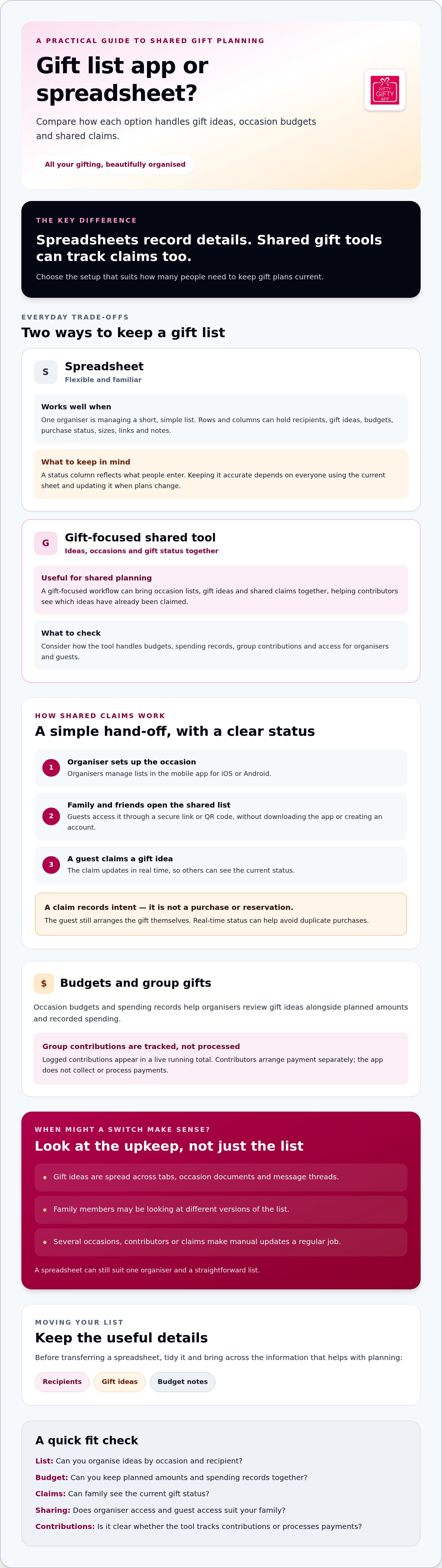
A spreadsheet can still be a sensible choice for one organiser managing a short, simple list. The distinction is straightforward: spreadsheets record details; shared gift tools can track claims too.
What a spreadsheet can do well for gift planning
Rows and columns make it easy to note a recipient, gift idea, budget and purchase status. Add custom columns for sizes, links or notes, and shape the sheet around the way your family plans. If you already use spreadsheets comfortably, there’s little to learn.
The trade-off is upkeep. A status column only reflects what someone has entered. Keeping it accurate depends on everyone using the current sheet and updating it when plans change.
Signs a gift spreadsheet needs too much manual upkeep
Take note when gift ideas are spread across several tabs, separate occasion documents and message threads. You might have a birthday list in one file and holiday suggestions buried in a chat. Finding the latest detail then becomes part of organising.
Outdated copies add another layer of doubt. A relative may be looking at an old version while the organiser has made updates elsewhere. Even if the sheet includes a “claimed” column, someone has to record each claim and make sure everyone sees the update.
More contributors can mean more follow-ups: reminders to check the list, messages asking whether an idea is still available, and repeated updates after someone chooses a gift. Nifty Gifty App is designed to keep shared claims current. Guests can claim gifts through a secure link or QR code without downloading the app or registering, and claims update in real time.
Keep the spreadsheet if one person can easily maintain a straightforward list. Consider switching when several occasions, contributors or gift claims turn manual updates into a regular job. The right setup should leave you more time for the thoughtful part: choosing gifts people will be glad to receive.
How a gift list app organises shared lists, budgets and claims
Once you’ve decided a shared list would help, the process is easy to picture: set up an occasion, add recipients and their gift ideas, then share the list with family and friends. The organiser can keep occasion budgets and spending records alongside the ideas, rather than piecing them together from separate messages.
With Nifty Gifty App, organisers manage lists in the iOS or Android mobile app and share them using a secure link or QR code. Guests can open the list and claim a gift without downloading the app or registering. The shared list gives contributors a clearer view of which ideas have already been claimed.
How shared gift claims work
When a guest claims an idea, the gift list updates in real time so others can see its current status. This helps avoid duplicate purchases. A claim is a note of intent on the list, though. It doesn’t purchase or reserve a product, and it doesn’t confirm that the gift has been bought. The guest still arranges that themselves.
This distinction matters when you’re coordinating across a family group. The organiser doesn’t have to rely on someone remembering to send a follow-up message before the list reflects a claim. Guests use the shared link or QR code, while the organiser maintains the occasion list in the app.
Keeping occasion budgets and group contributions visible
Budget and spending records give the organiser a place to review gift ideas alongside the planned amount for an occasion. This can make it easier to see what’s been noted and what’s been recorded as spending. Keep the notes simple and relevant to the occasion so the list remains easy to review.
Group gifts have a separate tracking need. Nifty Gifty App records logged contributions and shows a live running total, so the organiser and contributors can see how the total is progressing. Contributors arrange payment separately: the app tracks contributions but doesn’t collect or process payments.
If you’re considering a gift list app instead of spreadsheet tabs, look for a workflow that keeps ideas, claims and occasion records together while making clear what the tool does. Nifty Gifty App gift lists bring shared claims and occasion tracking together.
Gift list app vs spreadsheet: compare the everyday trade-offs
Both options can help you plan gifts. The difference is how much you want to customise and how much shared updating you’re prepared to manage. A spreadsheet gives you control over its layout. A gift list app can offer a workflow designed for occasions, gift ideas and claims.
When a spreadsheet is enough for your gift list
Stick with a spreadsheet if one organiser is handling a short list, changes are occasional and few people need to contribute. It may also suit you if custom fields matter and you already maintain one current shared document. If the setup works smoothly, switching may add little value.
When a gift list app may suit your group better
Consider an app if you’re coordinating several occasions, recipients or contributors and want gift status to stay visible to the group. Check how guests access the list, too. With Nifty Gifty App, organisers use the iOS or Android app, while guests claim gifts using a secure link or QR code without downloading the app or registering.
Spreadsheet collaboration features vary by tool and by how the organiser shares the file. Some groups may be comfortable editing one document; others may prefer a gift-focused shared workflow. If family members have different levels of confidence with technology, consider how easily they can open the list and understand its status.
Choose based on the work your family needs done. A short list with one careful organiser can stay in a spreadsheet. For several occasions and shared claims, a gift list app instead of spreadsheet rows may be more practical, especially when keeping everyone up to date takes the most effort.
How to move a gift list from a spreadsheet into an app
Moving to a gift list app instead of spreadsheet tabs doesn’t mean carrying every old note across. Start with a tidy list, bring over the details you still need, then check the sharing process before involving the whole family.
Prepare the spreadsheet before transferring gift details
Review the existing sheet first. Remove repeated entries, group details by occasion or recipient, and label each gift clearly as purchased, planned or still under consideration. Leave out private information that isn’t needed to organise the gifts. A lighter list is easier to check and maintain.
1. Pick the next occasion. Start with the occasion that needs active coordination, rather than moving every old list at once.
2. Keep useful details. Transfer recipients, gift ideas and relevant budget notes. Add purchase notes only if they’ll help you make a decision or keep track.
3. Set up the occasion in the app. Organisers use Nifty Gifty App on an iOS or Android mobile device. There’s no organiser desktop or web app.
4. Check the list. Review names, ideas and status labels so the new list is clear before anyone else sees it.
Set up sharing without adding extra steps for guests
Before inviting the wider group, share the list with one trusted person. Ask them to open it and try a claim, then check that the list reflects the update. This test can reveal unclear instructions early. Explain what a claim means: it updates gift status but doesn’t purchase or reserve an item.
Once the setup is clear, share the secure link or QR code with family and friends. Guests can claim gifts without downloading the organiser app or registering. Let them know they can check the shared list for current claims instead of relying on separate messages for every update.
Keep the spreadsheet as a reference while you check the new list, then decide whether you still need it. Avoid maintaining two versions for long, as that can leave people unsure which details are current. The aim is one clear place for the occasion’s ideas, notes and gift status.
For details about organising lists and sharing them, see Nifty Gifty App’s gift list features.
Choose a gift list app that fits how your family gives
A gift list app should fit the way your family shares ideas, not add extra steps. Before choosing one, check how it handles occasions, budgets, claims and guest access. Also make sure the organiser’s device is supported and the guest experience suits relatives with different levels of technical confidence.
Questions to ask before choosing a gift list app
Can you keep occasions separate? Check that recipients and gift ideas stay with the right birthday, celebration or holiday list.
Can guests view and claim gifts easily? Find out whether they need to download an app or create an account, and whether claims update for everyone.
Can you review budgets and spending? Look for a way to see occasion notes alongside the gift ideas, rather than maintaining separate records.
How are group contributions tracked? Check whether the tool records contributions and shows a running total. Confirm whether payments are handled separately.
Which devices can the organiser use? Check whether the organiser needs a mobile app or can manage lists another way.
These questions help you compare a gift list app instead of spreadsheet columns based on the jobs your family needs done. A spreadsheet may offer more freedom to build custom fields. A dedicated tool may bring occasion lists and shared gift claims into one gifting-focused workflow.
What Nifty Gifty App can and cannot do
Nifty Gifty App is designed for organisers to manage occasion lists, budgets and spending in its iOS and Android mobile app. There’s no desktop or web app for organisers, so consider whether managing lists on a phone suits you.
To share a list, the organiser can send a secure link or use a QR code. Guests can claim gifts without downloading the app or registering, and claims update in real time. This makes it easier for the group to check gift status and helps avoid duplicate purchases. A claim updates the list; it doesn’t purchase or reserve the gift.
For group gifts, Nifty Gifty App tracks logged contributions with a live running total. Contributors arrange payment separately because the app doesn’t collect or process payments. It also doesn’t sell gifts. The app helps organise the occasion and track shared details, while the family chooses and purchases the gifts.
If those features match how your family plans, Nifty Gifty App brings lists, occasion spending and contribution tracking together. If your current spreadsheet already keeps everything clear and up to date, there may be no need to switch.
Make your next occasion easier to organise
A spreadsheet can still suit a short list that one person keeps up to date. But if occasions, gift ideas and claims need regular updates from several people, a gift list app instead of spreadsheet rows may make coordination easier.
With Nifty Gifty App, organisers manage gift lists, occasion budgets and spending in the mobile app. Guests can claim gifts through a secure link or QR code without downloading the app or registering. For group gifts, a live running total helps organisers track logged contributions, while payments are arranged separately.
Choose the approach that fits your family’s habits and the amount of shared coordination involved. Organise your next occasion with Nifty Gifty App.
Then you can spend less time chasing updates and more time choosing thoughtful gifts. Here’s to gifting that feels joyful for everyone, including the person organising it.
Frequently Asked Questions
Is a gift list app better than a spreadsheet?
It depends on how you organise gifts. A spreadsheet can suit one person managing a short list, especially if custom columns matter and the document is easy to keep current. A gift list app instead of spreadsheet rows may suit a group sharing several occasions, budgets and gift claims. Compare the upkeep each option needs. If your current system works well, there’s no need to switch.
Can a spreadsheet help avoid duplicate gifts?
Yes, if everyone checks and updates the same current document. Add a clear status column, such as planned, claimed or purchased, and agree who will update it. The organiser may still need to remind contributors to check the sheet. A gift list app with real-time claims can make gift status easier to see, but a claim doesn’t purchase or reserve the gift. Agree how your group will use claims.
How do I move a gift list from a spreadsheet into an app?
Tidy the spreadsheet before transferring details. Remove repeated entries and label gifts as purchased, planned or undecided. Keep useful information, such as occasions, recipients, gift ideas and budget notes, and leave out details you no longer need. Add the active list to the app, then test sharing and claiming with one trusted person. Once the process is clear, share it with the wider group.
Do family members need to download a gift list app to claim a present?
It depends on the app. With Nifty Gifty App, the organiser shares a secure link or QR code, and guests can claim gifts without downloading the app or registering. Claims update in real time. The recipient doesn’t claim their own gift. Before sharing, explain that a claim updates the list but doesn’t purchase or reserve the gift, so everyone understands what to expect.
Can a gift list app track budgets and group contributions?
Some apps offer these tools, so check the features before choosing. Nifty Gifty App lets organisers manage occasion budgets and spending, and track group gift contributions with a live running total. It doesn’t collect or process payments. Contributors arrange payment separately using a method agreed by the group. This keeps the contribution record visible without suggesting that the app handles money.
Is Nifty Gifty App a gift shop or online registry?
No. Nifty Gifty App helps organisers manage gift lists, occasion budgets and spending, and track group contributions. It doesn’t sell gifts or gift cards, deliver purchases or connect lists to a store registry. Guests can claim an item through a shared link or QR code, while the organiser and contributors arrange the gift separately. Think of it as a tool for organising gifting, not purchasing gifts.
How much does Nifty Gifty App cost?
Nifty Gifty App has a 14-day free trial, followed by an annual AUD $7.99 subscription. Organisers use the mobile app on iOS or Android, while guests can claim gifts through a secure link or QR code without downloading the app or registering. The subscription is for organisers using the app. Guests don’t need an account to claim gifts from a shared list.


Comments