
Gift List Organiser App: Choose One That Fits Your Gifting

What if organising gifts took less effort than finding the idea you saved in a message last month? A gift list organizer app should bring gift ideas and occasion plans together, not give you another thing to manage.
If you’re the person everyone relies on, you know the routine: gift ideas tucked into notes, spending planned across several occasions, and family members who’d rather not download another app or create an account. It makes sense to look for a practical fit, not a long list of flashy features.
This guide compares what matters in a gift list organiser, from keeping wishlists together and tracking budgets to sharing lists and showing which gifts have been claimed. You’ll also see how Nifty Gifty App fits into an organiser’s routine: manage wishlists, occasion budgets and spending in the iOS or Android app, then share a secure link or QR code so guests can claim gifts without registering or downloading the app. For shared presents, it tracks contributions with a live running total, but doesn’t process payments. The aim is a practical way to organise gifting for every occasion while keeping things simple for everyone involved.
Table of Contents
What should a gift list organiser app actually help you organise?
Gift ideas end up in notes, family chats and the back of your mind. As a birthday, Christmas, wedding or baby shower approaches, the questions start: Who’s getting what? Has anyone chosen that idea? A gift list organizer app should make the plan easier to follow, not add another layer of coordination.
A gift list organiser app is a digital place to gather gift ideas and organise the plans around giving them. A wish list records what someone might like; you can read more about what a wish list is. Occasion tracking takes this further by helping an organiser keep plans for a particular event together. Shared-gift tracking has a different purpose: it helps a group coordinate a present. These features can work together, but they aren’t interchangeable.
What does a gift list organiser app do?
At its simplest, an app lets an organiser collect gift ideas, sort them into lists and update details when plans change. That’s useful when you think of a present months ahead or need to keep ideas for several people separate. Occasion tools can connect those lists to birthdays, Christmas, weddings or baby showers. Shared-gift features may show which gifts guests have claimed or record contributions towards a group present.
Roles matter. Organisers create and manage the plan. Recipients receive gifts; they don’t claim them. Guests may claim a gift, while contributors chip in towards a shared present. Apps handle these steps differently, so check how lists are shared and who can see claims or contribution updates.
Who benefits from organising gifts in one place?
If you plan gifts for several family members or friends, keeping ideas in one place can save you from searching old messages or relying on memory. It can also help households coordinate ideas, especially when relatives or friends are joining in on a shared present. A clear list gives everyone a common reference point instead of another round of “What are we doing?” messages.
Your routine should guide how much functionality you need. If you organise gifts just a few times a year, a simple list and easy sharing may be enough. If you plan throughout the year, separate occasion plans, budget tracking and visibility of gift claims or group contributions may be more useful. Before choosing a gift list organiser app, check that its sharing and tracking tools suit both you and the people helping out.
Which gift list organiser app features are worth comparing?
A gift list organizer app should fit the way you plan, share and track presents. Start with the basics: can you make separate lists for people or occasions, and update an idea when plans change? A list that’s easy to edit stays useful as preferences shift or someone else takes on part of the planning.
Quick checklist: compare lists, budgets, sharing, guest access and device support. Then check how those features work together. A list holds gift ideas; an occasion plan helps you see the wider plan, while sharing and claim updates help guests coordinate around it.
Can the app track budgets and spending?
A planned budget and spending already recorded are different things. Look for tools that let you set a budget, log spending and review a total for an occasion or list. That makes it easier to compare your plan with what you’ve spent across several gift occasions. Treat tracking as a way to see the figures, not a promise that you’ll spend less.
Can guests use a shared list without an account?
Check how guests open a shared list. Can they use a link or QR code, or must they register and download an app? Fewer steps can make sharing more practical for relatives and friends who don’t want another account. Also check whether guests can see gift claims and whether claim updates appear in real time, so people can make decisions using the latest list.
Does the app fit your devices and routine?
Confirm that the organiser app supports your iOS or Android device, then consider when you’ll use it. Being able to update a list while you’re out may suit a busy household better than a tool you only open at home. If you need a desktop or web option, check for it before choosing, as organiser access differs between apps.
Keep the comparison grounded in what you actually do. A year-round planner may value occasion budgets and spending records, while someone organising a single event may mainly need a list that’s simple to share. More features aren’t automatically more useful if they add steps to your routine.
For one example to assess against these criteria, Nifty Gifty App gift organising brings wishlists, occasion budgets and spending together for organisers on iOS and Android. Guests can claim gifts through a secure link or QR code without an account or app download. Claims update in real time, making shared plans easier to follow.
How to compare a gift list organiser app for organisers and guests
A gift list organizer app needs to work for the person coordinating presents and the people joining in. Compare what each person can actually do, not just what the app calls a feature. In particular, separate claiming a gift from paying for it: a guest’s claim shows their intention to give that item, but it doesn’t confirm they’ve bought or paid for it.
What should organisers be able to manage?
Check that organisers can create lists, group gift ideas by occasion and update details when plans change. If you’re coordinating a shared present, look for a clear way to review its progress alongside occasion budgets and spending. Consider where you’ll use the app, too. Mobile access can help you update a list while you’re out instead of waiting until you’re back home.
What should guests be able to do?
Guests should be able to open the list easily and check whether someone has claimed a gift. Find out if they need to install an app or create an account before they can take part. Simple access matters when family and friends have different preferences about apps. Keep the roles clear, too: guests claim gifts, while recipients receive them.
How should group contributions be explained?
For a group gift, check whether the organiser can record contributions and see a running total. Then clarify how contributors will arrange payment. An app that tracks contributions doesn’t necessarily collect or process them, so agree on payment arrangements separately. Decide who will purchase the gift and who will keep contributors updated on the total and the plan. Clear roles help everyone understand how to chip in.
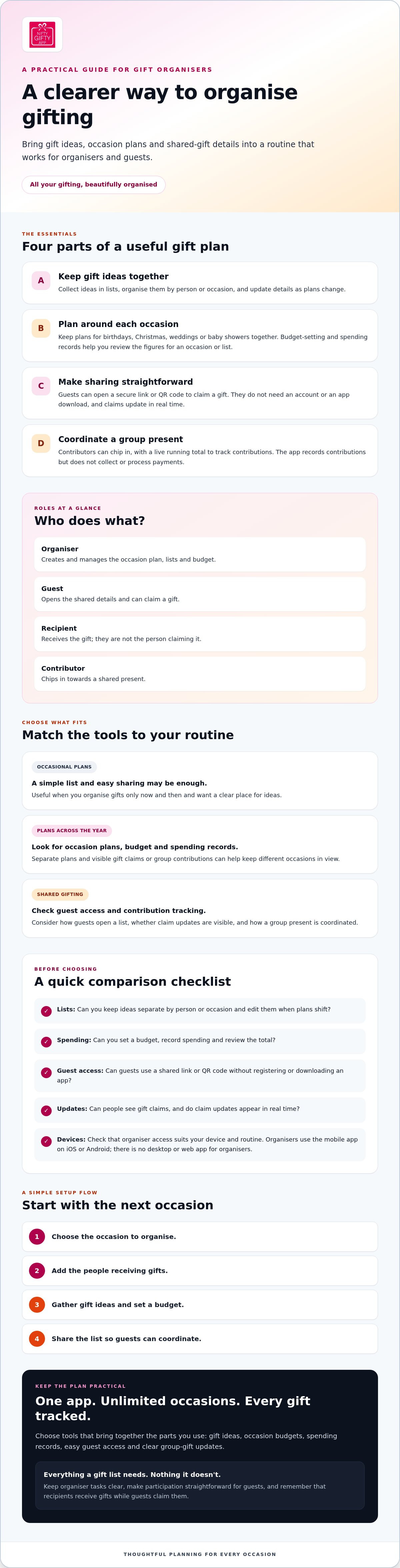
How to choose and set up a gift list organiser app
Give a gift list organiser app a practical test before moving every plan into it. Start with your next occasion, see how the list works for you and your guests, then decide whether it suits your routine.
Start with one occasion and a clear plan
Choose an upcoming birthday, holiday or celebration. Build the plan in a few straightforward steps:
Choose an occasion so the list has a clear purpose.
Add recipients and keep each person’s ideas distinct.
List gift ideas you’re considering, then update them as plans change.
Set a budget that reflects your own spending plan.
Share the list with the people who are helping coordinate gifts.
Keep the test small. A birthday or family celebration can show whether the app is easy to update and whether everyone understands how to use the shared list. If you want to build the habit beyond one event, a year-round gift ideas guide can help you decide how to capture ideas as they come up.
Share the list and explain how claims work
Send the list through a channel your guests already check, and explain what a claim means. Ask participants to check the current list before choosing a gift, then claim their choice promptly. Shared claims help others coordinate only when people check the latest status. A claim signals that someone intends to give that item; it doesn’t confirm that it’s been purchased.
For a group present, agree on how contributors will chip in and how payment will be arranged outside the app. Make it clear who will purchase the gift and who’ll keep everyone informed about the plan.
Check the app before relying on it
Before setting up your list, confirm your device is supported, check how guests access shared lists and review the subscription terms. Organisers use Nifty Gifty App on iOS or Android. It has a 14-day free trial, followed by an annual AUD $7.99 subscription. Use the trial to assess the features you need, such as managing wishlists, occasion budgets and spending, before adding more plans.
If shared lists and occasion planning are what you’re looking for, see how Nifty Gifty App organises shared gift lists.
How Nifty Gifty App brings gift lists, budgets and sharing together
A gift list organizer app is most useful when it helps the organiser keep gift ideas, occasion plans and shared-gift details in view. Nifty Gifty App brings these tasks together in one mobile app, with tools for wishlists, budgets, spending and group contribution tracking.
What organisers can manage with Nifty Gifty App
Organisers can create wishlists and monitor budgets and spending for an occasion. This keeps gift ideas and the spending plan together rather than scattered across notes and message threads. For a shared present, the app records contributions and displays a live running total, so the organiser can see how much has been contributed so far.
Contribution tracking is not payment processing. Nifty Gifty App doesn’t collect or transfer money, so contributors need to arrange payment separately. The app also doesn’t sell gifts. The organiser or group chooses and purchases the present outside the app.
How guests can view and claim shared gifts
Organisers can share a list with guests using a secure link or QR code. Guests can claim gifts without registering or downloading the app, and claims update in real time. This gives other guests a current view of which gifts have been claimed, helping the group coordinate its plans.
A claim marks an intention to give a particular gift. It doesn’t make a payment, purchase the item or arrange fulfilment. The recipient receives the gift; guests claim items, and contributors chip in towards group presents.
What to check before getting started
Organisers use Nifty Gifty App on iOS or Android, so check that your device is compatible before setting up your lists. The app has a 14-day free trial, followed by an annual AUD $7.99 subscription. Review the current subscription terms before getting started, and consider whether wishlist management, occasion budgets, spending records and contribution totals match the way you organise gifts.
If those features suit your routine, organise your gifting with Nifty Gifty App.
Make your next occasion easier to organise
The right gift list organizer app should suit your routine, not add extra steps. Compare how it handles gift ideas, occasion budgets and spending, then check whether guests can access shared lists and see current claims without signing up for another account.
Nifty Gifty App brings wishlists, occasion budgets and spending together for organisers. Guests can claim gifts through a secure link or QR code without registering or downloading the app. For group presents, organisers can see a live total of contributions. The app tracks those contributions but doesn’t process payments, so contributors arrange payment separately.
Start with a list for your next occasion and see whether the features feel practical for you and your guests. If you’re ready to bring your gift plans together, organise your gifting with Nifty Gifty App. A little planning can leave more room to enjoy the celebration and the thought behind each gift.
Frequently Asked Questions
What is a gift list organiser app?
A gift list organiser app gives you one place to collect gift ideas and organise them around people or occasions. Depending on its features, it may also help you track budgets, spending, gift claims or group contributions. For example, you could keep birthday ideas for family members separate from plans for a wedding. Before choosing, check what the organiser can manage and what guests can access.
How do I choose a gift list organiser app?
Start with the tasks you want help with, such as collecting ideas, organising occasions, tracking spending or coordinating a group gift. Then check device support for organisers, guest access and whether gift claims update for others. Read the subscription terms before signing up. A short test with your next occasion can show whether the app fits your routine before you add all your gift plans.
Can a gift list organiser app help avoid duplicate presents?
Shared lists can help guests see which gifts have been claimed, making it easier to coordinate and reducing the chance of duplicate presents. Check whether claims update in real time and whether guests can view the list easily. An app supports clearer planning, but guests still need to check the latest list and communicate. Claims don’t confirm that a gift has been purchased, and no app can guarantee duplicates won’t happen.
Do guests need to download an app to claim a gift?
It depends on the app. Some require guests to register or install an app, while others let them claim gifts through a shared link or QR code. Check the guest steps before sharing a list, especially if your family would rather not sign up for another service. With Nifty Gifty App, guests can claim gifts through a secure link or QR code without registering or downloading the app.
Can a gift list organiser app track group gift contributions?
Some apps let organisers record contributions and follow a running total. Check whether tracking means recording contributions only, or whether the app also processes payments. Nifty Gifty App shows group gift contributions with a live running total, but doesn’t collect or process payments. Contributors arrange payment separately. Before the collection starts, agree who’ll purchase the gift and how they’ll keep everyone updated.
Is Nifty Gifty App available on iPhone and Android?
Yes. Organisers use Nifty Gifty App on iOS and Android mobile devices. There’s no desktop or web app for organisers, so check that your device is compatible before setting up a list. Guests don’t need to download the app or create an account to claim gifts. Organisers can share a list through a secure link or QR code, and claims update in real time.
How much does Nifty Gifty App cost?
Nifty Gifty App has a 14-day free trial, then an annual AUD $7.99 subscription. Check the current subscription terms in the relevant app store before signing up, including renewal details and what happens when the trial ends. That way, you can review the cost and conditions that apply to your subscription before you get started.


Comments