
App to Coordinate Group Gifts: Compare Options for Every Family

Distance shouldn’t stop family from giving together. An app to coordinate group gifts can bring gift ideas, private claiming and contribution tracking into one place, so relatives in different cities or countries can take part without endless message threads. Choose one that fits how your family shares and organises.
It’s frustrating when relatives need an account just to join in, or nobody knows which gift ideas are already being handled. A simple setup, clear claiming and an easy way to participate from different locations make group gifting more manageable.
This guide covers the features that matter most: account requirements, ease of use, private claiming and support for contributors in different places. You’ll learn what to look for, how to choose a tool that suits your family, and how a gift-planning app can keep ideas and group contributions together.
Table of Contents
Why Organise a Group Gift?
In Australia, check that the same group-gift service has iOS and Android versions before choosing it; platform support varies by app. Refund handling also varies: before collecting contributions, agree what happens if the gift is cancelled or the total falls short, and check how the collection method returns funds.
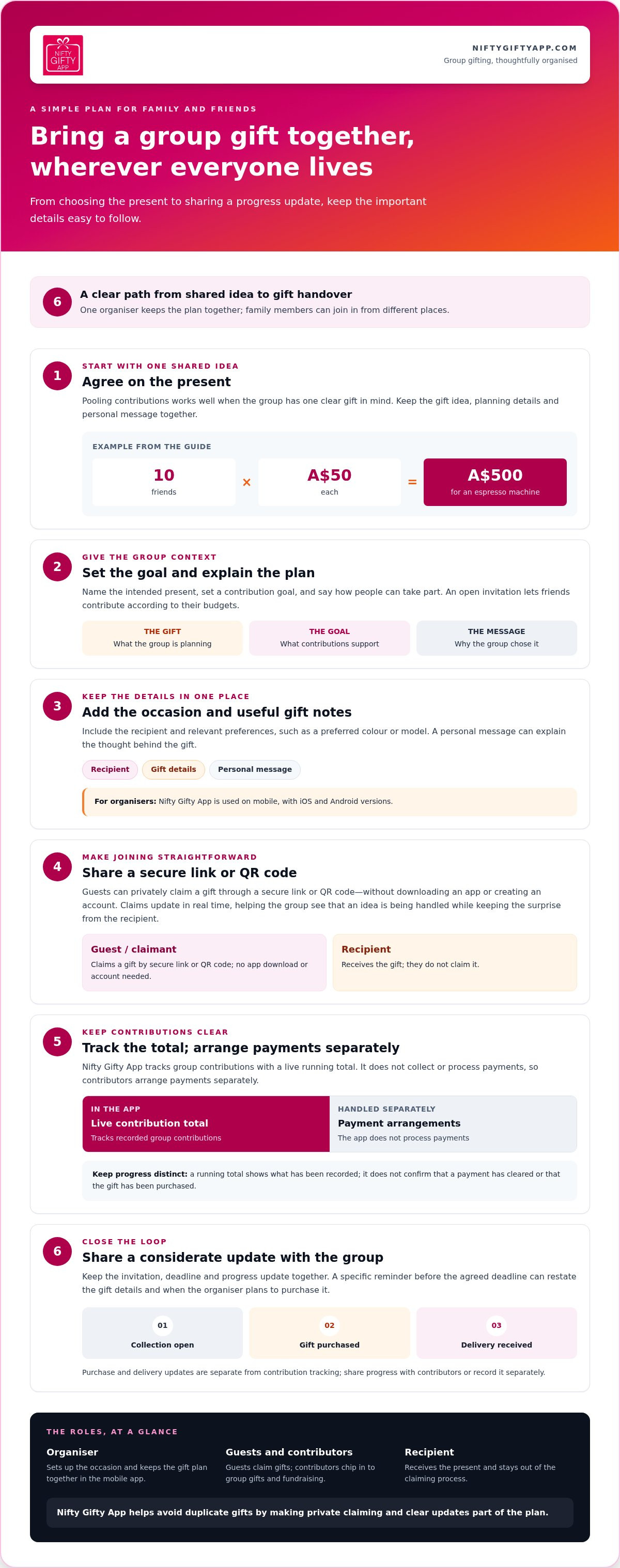
A group gift gives friends a way to pool contributions towards one considered present, rather than each choosing separate gift ideas. For example, ten friends contributing A$50 each can reach A$500 for an espresso machine. The organiser can share the goal, keep the plan in one place and send a personal message with the gift, such as a note explaining why the family chose that particular present.
Pooling Contributions for a Shared Gift
Pooling works well when the group has one clear idea and wants to contribute to it together. A shared gift list serves a different purpose: it helps people record and claim individual ideas. Agree on the present, set a contribution goal and explain how people can take part. An open invitation lets friends contribute according to their budgets.
Collection Setup and Gift Progress
An online collection can give the group one place to see the gift goal and contribution progress. Before sharing it, name the organiser, describe the intended present and explain what happens if plans change. Purchase and delivery updates are separate: record them if the tool supports them, or share progress directly with contributors.
Private claiming solves a different problem. When someone claims an idea, others can see that it’s being handled while the recipient stays unaware. Include useful details, such as the recipient’s preferred colour or model, to help the shopper choose the right item. A personal message can bring everyone’s contributions together with a warm explanation of the gift.
Choose according to the group’s main task: use a collection-focused option to pool contributions, or a list-focused option to track individual gift ideas.
Do contributors need to create an account?
Not always. Account requirements depend on the tool and the task: someone claiming a gift may have different access needs from someone contributing money. Before inviting family, check whether each person can open the collection, see the details and take part without installing an app or creating a profile.
A secure link or QR code can make claiming a gift easy for guests. For example, an aunt can scan a code and privately claim a present without downloading an app or opening an account. Contribution access is a separate matter. A tool may track intended contributions, while payment takes place separately.
Alternatives include bank transfers, shared spreadsheets and gift registries. Bank transfers are usually free, but the organiser may need to tally payments manually. A registry gathers gift ideas, but doesn’t necessarily collect group contributions. Choose according to whether the group needs a shared collection, a record of presents, or both.
For an online collection, start with the gift goal and the organiser’s contact details. Invite contributors by email or shareable link, and explain how to contribute in one clear message. For a Christmas present, include the recipient, deadline and planned purchase. Friends can then see what their contribution supports before deciding whether to join in.
Keep contribution tracking separate from purchase progress. A live running total shows what’s been recorded, but doesn’t confirm that a payment has cleared or a present has been purchased. Add a simple status note, such as “collection open”, “gift purchased” or “delivery received”, so contributors know what’s happened.
Reminders work best when they’re specific and considerate. Send one message before the agreed deadline, restate the gift and collection details, and tell the group when you plan to purchase the present. A clear cut-off lets the organiser make a decision without chasing everyone individually. Don’t imply someone has contributed until their payment is recorded.
For families spread across different locations, an account-free link can make it easier for guests to join, while a clear payment method helps contributors take part. Keep the invitation, deadline and progress update together so everyone knows what to do and the organiser has less to manage.
Choosing an app that is easy for the whole family to use
An easy-to-use gift app should make sense to the organiser and the relative opening the invitation. Start with the devices your family uses, then check the setup steps, labels and sharing options. If family members use both iPhone and Android, confirm the organiser’s app supports both platforms before choosing a tool.
Keep roles clear. Choose one organiser to add the occasion, recipient and gift details, then pick one channel for updates. A family group chat can carry the invitation while the app holds the working list. Avoid splitting key instructions across email, texts and separate notes. Everyone should be able to open the invitation and quickly see what to do.
Test the process with one relative before sharing it with the whole family. Ask them to open the link, find the recipient and understand how to respond. If they need several explanations, simplify the gift description or remove an unnecessary step. For a holiday gathering, write “Aunty June’s birthday” rather than “June” to make the occasion and recipient clear at a glance.
Next, decide whether the group wants a specific present or a flexible gift card. A retailer eGift card suits someone who enjoys choosing from one shop. An AnyCard-style option may work when you don’t know the recipient’s preferred retailer. Check the card’s terms, eligible retailers and delivery method before choosing it. The app can help organise the decision, but the organiser arranges the card separately.
Consider the surprise, too. If the recipient shares the family account or can see its notifications, keep planning messages in a private channel. Tell contributors who can view the gift details, and avoid putting the recipient’s name in a public group title. A short note such as “Keep this present quiet until Sunday” gives relatives a clear cue without adding complicated rules.
Use this quick test before choosing an app:
Setup: Can the organiser add a recipient and occasion without guidance?
Access: Can relatives open the invitation on their usual device?
Clarity: Are the gift, response and next step easy to understand?
Privacy: Can the family keep the surprise away from the recipient?
If all four answers are yes, the app is more likely to fit how your family already communicates. Decide before buying a card or present, then share one clear invitation so everyone knows where to take part.
Private item claiming and avoiding duplicate gifts
Private claiming lets a family member mark a gift idea as taken without telling the recipient. For example, if Sam claims the cookbook on a shared list, other shoppers can see it’s spoken for while Dad stays unaware. Look for a platform that updates claims promptly, so nobody selects the same present based on an outdated view.
That works differently from a group chat. A message saying “I’ll get the cookbook” can disappear beneath birthday photos and Christmas plans. A digital list keeps each idea and its claim together. Before sharing it, check what each person can see: contributors may need to view gift status, while the recipient should stay outside the planning group.
Private list access matters, too. A password-protected list can limit who sees gift ideas, recipient details and planning notes. A secure invitation link or QR code offers another way to share access. Set expectations before sending either: ask relatives not to forward the link, and keep the recipient out of the planning group chat.
Contribution visibility is a separate choice. Some families want everyone to see the collection total; others prefer to keep individual amounts private. Agree on this before inviting people. For instance, the group can share overall progress without listing who contributed what. The platform should make those distinctions clear, rather than leaving contributors to guess what others can see.
Use these steps to reduce duplicate gifts and protect the surprise:
Add one gift idea with enough detail to identify it, such as the author and title of a book.
Share the list only with the people involved in choosing or purchasing gifts.
Ask each shopper to claim an idea before purchasing it.
Update the list if someone changes plans or selects a different present.
Real-time claim updates help relatives see changes quickly, especially when siblings shop from different cities. But tracking only works if everyone uses the same list. If one cousin claims a gift in the app and another messages the group chat, the organiser may need to combine the updates.
Choose a platform whose privacy controls suit the occasion. For a surprise anniversary present, restrict access to the planning group and keep the recipient out. For a shared family list, give shoppers enough visibility to see which ideas remain available, and agree whether contribution amounts stay private.
Coordinating gifts across different locations
For Australian families spread across cities or countries, compare tools by how clearly they share plans across distance. An app to coordinate group gifts suits relatives who want ideas and claims together. A group chat or spreadsheet may suit a family that prefers manual updates. The right fit depends on how members plan, contribute and keep the recipient out of the discussion.
Check the organiser’s device needs first. Some services require an organiser to use a mobile app, while others work in a browser. Then consider how guests join. A shareable link or QR code can make access easier for relatives who don’t want another app. Check whether claims update automatically, so family members can see the latest status.
Time zones can complicate birthdays and family celebrations when relatives live overseas. Put the occasion date, purchase plan and contribution deadline in one shared place. State the recipient’s local date in the invitation, then make the organiser’s cut-off clear. Everyone has a common reference, even if messages arrive while someone is asleep.
Group gifting also needs a clear plan for the present itself. Decide whether the organiser will purchase it locally or ask a relative near the recipient to take charge. For example, one family member could arrange a local experience while others contribute from afar. Record who’s responsible, then share progress with contributors.
Keep the gift plan separate from delivery assumptions. A digital list can show the chosen idea and who has claimed it, but may not track a parcel. If the recipient lives elsewhere, agree who will arrange delivery and how the group will share updates. A short note naming the person responsible makes the next step clear.
Before choosing a tool, compare these practical details:
Access: Can members open the invitation on their usual device?
Updates: Do claims and contribution totals refresh automatically, or must someone edit them?
Roles: Is it clear who organises, contributes and purchases the gift?
Privacy: Can relatives plan without revealing the surprise to recipients?
There’s no single option for every Australian family. When choosing an app to coordinate group gifts, compare access, updates and responsibilities with a shared list, spreadsheet or group chat. Choose the format that makes it easiest for relatives in different locations to take part.
The best fit is an app that lets relatives share ideas and privately claim gifts, works on their usual devices and updates claims automatically. Compare it with a shared list, spreadsheet or group chat, then choose the option that makes organising, contributing and purchasing clear for everyone.
Nifty Gifty App
Nifty Gifty App suits organisers who want gift ideas, private claiming and group contribution tracking together. Organisers use the mobile app on iOS or Android, while guests claim gifts through a secure link or QR code without downloading an app or creating an account. Real-time claim updates help family members in different locations see what’s being handled.
For a shared present, contributors can chip in while the organiser follows a live running total. Nifty Gifty App tracks contributions but doesn’t collect or process payments, so contributors arrange payment separately. It keeps the gift plan and contribution progress visible without taking over the purchase or delivery.
If that setup fits your family’s next occasion, visit niftygiftyapp.com to explore Nifty Gifty App.
Make the next occasion easier to organise
Let your family’s habits guide the choice, not a long feature list. For the next occasion, decide what would make organising simpler: fewer follow-up messages, a clearer plan or an easier way for relatives to join in. That gives you a practical way to judge whether a tool fits your family.
An app to coordinate group gifts should support the way your family already shares plans, especially when relatives live in different places. Start with one occasion, keep the process simple and adjust as you learn what suits the group. The aim isn’t to add another task, but to make room for the thought behind the gift.
If you’re ready to organise your family’s gifting in one place, explore Nifty Gifty App and see whether it suits your next occasion. Here’s to thoughtful gifts and more time to enjoy giving them.
Frequently Asked Questions
Why coordinate with groups?
Group coordination helps relatives agree on one plan instead of choosing separate presents. It can also make a shared gift feel more personal: contributors might add a short message about a family memory or why they chose it. For a milestone birthday, ask everyone to send one line to the organiser, then combine the notes in a card with the present.
Can I be in multiple groups?
Yes. You can take part in separate gift groups for different people or occasions. Give each one a distinct name, such as “Grandad’s retirement” or “Mia’s graduation”, so messages and decisions are easy to recognise. If the same relatives are in both, note which group you’re replying to. This helps prevent an update for one celebration being mistaken for another.
How do fees work?
Fees depend on the app’s subscription terms and what the charge covers. Nifty Gifty App has a 14-day free trial, then $7.99 a year. Before signing up to any gifting tool, check whether its fee is recurring and whether it applies to the organiser or participants. Keep that app cost separate from the amount your family chooses to spend on the present.
How do invite links work?
An invite link gives participants direct access to the relevant gift plan. Add a short note explaining the occasion and what you’re asking people to do. For example, “Please add your message for Nan’s card by Friday” is clearer than sending a bare link. If you’re sharing several plans, label each message so relatives know which celebration it concerns.
What Makes a Good Christmas Gift App?
A good Christmas gift app should help the organiser plan for several recipients without treating the whole family as one list. Consider how you’ll record preferences, save ideas for later and choose presents for each person. Try setting up one recipient first, then see whether the details still make sense when you return to the plan.
What happens if you don’t reach the target?
Decide on a fallback before the collection starts. The group could choose a smaller present, extend the deadline or let the organiser buy the original gift only if the total is sufficient. Include that choice in the invitation, along with who’ll make the final decision. For example, the organiser might switch to a handwritten family book if the planned experience is out of reach.
How do group gifting apps collect contributions and pay the recipient?
Payment arrangements vary between services. Some handle transactions within the service, while others leave contributors to pay the organiser through an agreed method. The recipient usually receives the chosen present, rather than a payment from every participant. Before the group starts, decide who’ll purchase the gift and how they’ll tell everyone the plan is complete.
What fees do group gift apps charge in Australia?
There’s no standard fee across group gift apps in Australia. Compare the subscription or service charge, how often it applies and who pays it. Look for separate transaction costs if the service handles payments. These details affect the organiser’s choice, so read the pricing terms before creating a group and explain any relevant charge clearly to participants.



Comments