
Birthday wishlist app for sharing gift ideas with family

A birthday wishlist app brings gift ideas together in one shareable list and helps prevent duplicate presents. Add useful details, such as a preferred colour or size, then let guests claim gifts so everyone can see what’s already taken. It keeps the list personal while leaving guests room to choose.
It’s lovely when family want to choose something you’ll enjoy. It’s less lovely when your favourite ideas are buried in messages or two people arrive with the same present. A shared list keeps gift ideas together without taking the fun out of choosing.
Learn how to build a useful birthday wish list, gather ideas from different stores, add personal notes and share it with family near or far. We’ll also explain how gift claims work, what helps prevent duplicate presents, and how to keep the whole process easy for the organiser and the guests.
Table of Contents
Adding products from different stores
A birthday wishlist app can bring gift ideas from different shops into one place. Check whether it accepts Australian retailer links and displays prices in A$. If prices appear without a currency label, add the amount and A$ in a note. This helps relatives understand the listed price without guessing which currency applies.
For example, add a book from Booktopia, a toy from an Australian retailer and a kitchen item from a local shop. Keep each item linked to its own product page. A direct link saves relatives from searching through a retailer’s home page, where similar products can be hard to tell apart.
Some services offer a browser plugin or extension for saving products as you browse. If you’re using one, review the saved title, image and link before sharing. Otherwise, copy the product link and enter the item details yourself.
Can a birthday wishlist app import products from any online store or add offline gift ideas? Automatic importing depends on the service and retailer page. If a product won’t import, enter it manually. For an offline idea, add its name, shop and a description relatives can recognise.
Manual entry works for a gift spotted at a weekend market or in a shop window. Try “green ceramic serving bowl” rather than “bowl”. Include the shop name or suburb, plus any details that distinguish the item. If the app supports photos, an image can help guests recognise the right style.
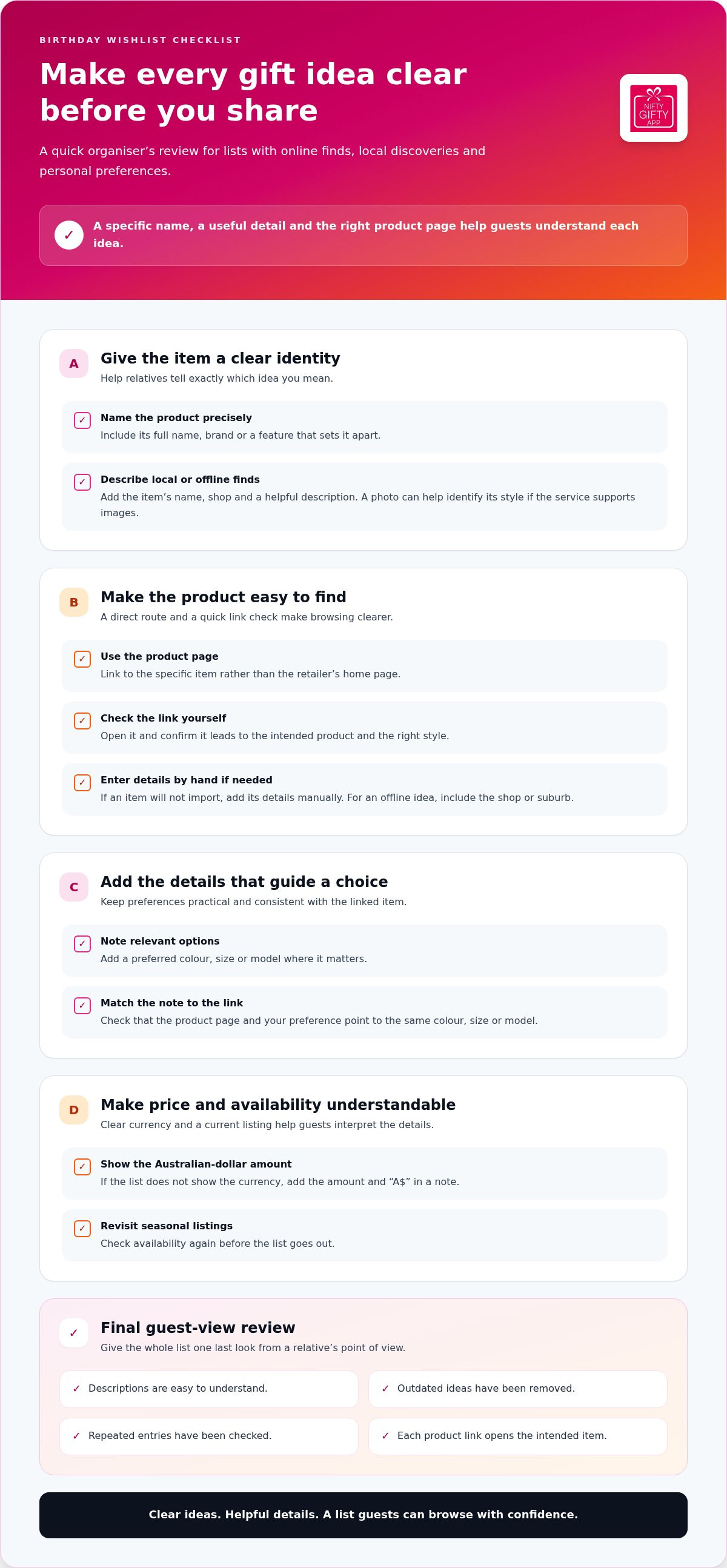
Before sharing each item, check these details:
Product: Include its full name, brand or identifying feature.
Link: Use the product page, not the retailer’s home page.
Price: Show the Australian-dollar amount if the app supports it.
Options: Add a preferred colour, size or model.
Availability: Revisit seasonal listings before sharing.
Do birthday wishlist apps support Australian retailers, local shopping links and A$ prices? They can, if the service accepts local links and supports Australian-dollar pricing. Add the direct page from the Australian retailer and check the currency display. For an item without a product page, a shop name and clear description give relatives a practical starting point.
Open every link before sending the list. Confirm it leads to the right product, colour and size. A pink water bottle link won’t suit a note asking for blue. A quick review helps keep ideas from different shops clear and easy for family to find. That’s a useful final step with a birthday wishlist app, especially when the list combines online products and local finds.
Creating a birthday wish list
Begin with the birthday person’s interests, everyday needs and preferences. A birthday wishlist app can keep those ideas together for guests to browse and claim.
Comparing App Features and Ease of Use
Compare how each service handles adding ideas, editing details, sharing lists and showing gift claims. Try those tasks with an example, such as adding a board game and changing its edition. Look for clear menus and easy-to-read item details. Choosing a birthday wishlist app means weighing useful features against how simple it feels for both organisers and guests.
How do popular apps compare on features, ease of use and privacy? Compare the same tasks across your options, including editing a list and opening it as a guest. The right fit depends on what your family needs and how easily everyone can use it.
Privacy when Choosing an App
Review what information appears on a shared list. A recipient’s name, preferences and product links may be visible to guests. Check whether the service lets you control who can view or edit the list. Keep notes focused on gift choices, rather than adding personal details relatives don’t need.
Which birthday wishlist apps are available in Australia? Look for features your family will use, straightforward sharing and a simple guest experience. Check these points before adding personal information or sending a list to relatives.
Once you’ve chosen a service, give the list a title guests will recognise, such as “Mia’s birthday”. Add a mix of practical items, favourite treats and experiences, such as a cookbook, art supplies or a pottery class. Different options let relatives choose something that suits their connection with the recipient.
Make each entry specific enough to guide a choice. For a book, note the author, title or preferred format. For clothing, add the size and colour preference. For an experience, describe the activity and setting, such as a family picnic or beginner pottery session. Avoid so much detail that the idea feels like an exact order.
Before sharing, review every item from a guest’s point of view. Check that names and descriptions make sense, remove ideas that no longer fit, and mark priorities if the service allows it. A final pass can also catch duplicate entries, such as the same novel listed under two editions. Then send the finished list to the intended guests.
A sample birthday gift list can also help guests compare options at a glance. Showing an item name beside its price gives relatives a clearer sense of the choices and helps them decide what fits their plans. Keep prices tied to the specific listed item, and check that each description still matches the intended gift before sharing. A range of options can make the list useful to guests with different budgets without making any one choice feel expected. Guests can then choose an idea that feels appropriate, while the recipient still has room for a welcome surprise.
Gift reservations and avoiding duplicate presents
Gift claims give family a shared view of which ideas are spoken for. Choose a birthday wishlist app with clear, real-time claim updates, then share the list before relatives start choosing.
Gift-Giver Access Without an Account
Check how relatives can open the list before sharing it. With Nifty Gifty App, guests use a secure link or QR code to view and claim gifts in a browser, without downloading the app or creating an account. That makes it easy for relatives to take part on their own devices.
Keep the invitation message simple. Ask guests to open the link, choose an available item and claim it before purchasing. Share the link in a family chat or print the QR code for a birthday lunch. The organiser manages the list in the app, while guests access it through the link or code.
Ticking Off Wishlist Items
Look for a clear claim action beside each gift. In Nifty Gifty App, gift statuses update in real time, so relatives can see when an item has been claimed or purchased. One guest can claim a board game, and others can choose a different gift.
A claim is not the same as confirming a purchase. Guests can claim an idea before buying it, so they should let the organiser know if their plans change. Keep similar entries distinct, too: label a hardcover and paperback separately to avoid confusion.
Gift reservations are most useful when each item has one clear status. If a list only lets guests tick items off, explain what the tick means. Does it show a gift is claimed, or simply mark it as someone’s choice? That small distinction matters when cousins are coordinating in a group chat.
Use a separate occasion for each person and celebration. Names such as “Ella’s birthday” and “Noah’s birthday” make it easier to direct relatives to the right list. Keeping recipients’ gift ideas separate helps guests claim a gift for the right person.
For a group present, name one organiser to coordinate the gift. Other relatives can contact that person rather than each making separate plans. Nifty Gifty App can track group gift contributions and show a live running total, but it doesn’t collect or process payments. Contributors arrange payment directly with the organiser.
Before sharing, review the list as a guest. Check that claimed gifts look different from available ones, and that names identify the right occasion. A clear status, a separate list for each recipient and a quick update when plans change all help relatives choose with confidence.
Sharing a wishlist with friends and family
A birthday wishlist app lets an organiser prepare gift ideas and share them with guests. With Nifty Gifty App, create the list in the mobile app, then share it through a secure link or QR code.
Family Groups and Shared Wishlists
A shared family list gives relatives one place to find gift ideas. Use a clear title, such as “Ava’s birthday”, and send the link to the family group or invited guests. For several celebrations, create a separate occasion for each person so relatives can find the right list quickly.
For a group present, agree who will coordinate before relatives make separate plans. A short note with the shared list can explain who is gathering ideas or coordinating contributions. Keep updates in the same family conversation where possible, so everyone can find the current details without searching through old messages.
Privacy and Security when Sharing
A wishlist can show a recipient’s name, preferences and gift links. Before sharing, consider who can open the list and whether guests can edit it. Share only details needed to choose a present. Avoid adding a home address or other sensitive personal information to item notes.
What privacy and security risks should users consider when sharing a birthday wishlist? A forwarded link could reach people beyond the intended group. Review the sharing controls, send the link only to the people who need it, and remove access after the occasion if that option is available.
How do birthday wishlist apps work for creating and sharing a list? The organiser adds gift ideas, then shares the list with guests. In Nifty Gifty App, guests open it through a browser link or QR code and can claim gifts without downloading the app or creating an account.
Before sending a list, use this quick check:
Title: Name the person and occasion clearly.
Audience: Send it to the relatives who need access.
Permissions: Review whether guests can view, edit or claim items.
Current details: Share the latest list rather than an old screenshot.
Group plans: Explain who is coordinating a shared present.
A family chat can keep the link and practical updates together. If someone shares a screenshot, direct guests to the live list so they see current gift statuses. With Nifty Gifty App, the organiser shares one up-to-date list instead of repeating every change in separate messages.
Relatives may use different messaging services, so share the list through a channel they already use. Open the link before forwarding it widely to make sure the title and list are clear. Guests can also scan the QR code to open the list in a browser.
Personalising a wish list
A useful wish list sounds like the person it celebrates. Add details that help relatives choose thoughtfully, rather than listing product names without context.
Start with preferences that affect the choice. If Mia loves gardening, “soft gloves for potting herbs, in a bright colour” gives family more guidance than “gardening gloves”. For a reader, name a favourite author or format. For someone who enjoys cooking, mention a cuisine or kitchen task they like.
Specific notes make each idea easier to understand. Add a preferred colour, size, material or model when it matters. “A navy cotton apron” is clearer than “an apron”. For an experience, describe the activity and setting, such as a relaxed pottery class or a picnic near the beach. Relatives can then choose an option that fits the person.
Balance personal guidance with room for choice. A list with only exact product specifications can feel like an order form. Mix precise ideas with broader interests:
Exact preference: A hardcover copy of a favourite novel.
Useful direction: A plant pot for the balcony herb garden.
Flexible idea: Art materials for weekend painting.
Shared experience: A family lunch at a place the recipient enjoys.
Explain the reason behind an idea when the context helps. “A compact umbrella for the school bag” shows why size matters. “A replacement for the chipped blue mug” makes a practical request feel personal. Keep notes brief so the important detail stands out.
Consider the recipient’s everyday preferences, too. If they value low-waste choices, say they prefer reusable materials. If they enjoy cooking with their grandchildren, suggest an activity they can share. Avoid adding assumptions about brands or styles. A note such as “earthy colours, rather than bright prints” gives helpful direction without narrowing every choice to one item.
Include ideas for different relationships and budgets. A close sibling might choose a personal keepsake, while a colleague may prefer a practical gift. Mark which details are essential: for a book, the author may matter more than the cover colour. That distinction helps guests choose thoughtfully.
Give each idea a final read from a relative’s perspective. Could they understand what the recipient likes, what detail matters and where the idea came from? Replace “something for the garden” with “herbs for the kitchen windowsill”. For a birthday or family celebration, organise a personalised gift list around the person’s own tastes.
Nifty Gifty App
Nifty Gifty App helps organisers keep gift ideas and claims together for birthdays, showers and weddings. Organisers create and manage lists in the iOS or Android app, then share them with guests through a secure link or QR code.
Guests can claim gifts without downloading the app or creating an account, and statuses update in real time. For a group gift, contributors can chip in while the app tracks a live running total. Payments are arranged directly with the organiser; the app doesn’t collect or process them. Gifts are chosen and purchased by guests.
If you’d like a practical way to organise your family’s gift lists, visit Nifty Gifty App.
Make the next celebration feel more personal
Let the next occasion start with the person, not the list. Keep a note of the hobbies, small preferences and shared experiences they mention throughout the year. Those details can turn a generic set of gift ideas into something that feels thoughtful and personal.
A birthday wishlist app can keep gift ideas ready for family while leaving guests room to choose something that suits them. With Nifty Gifty App, create an occasion, add ideas and share the live list with the people invited to celebrate.
For a practical way to bring gift ideas and family coordination together, explore Nifty Gifty App. Make space for thoughtful choices, then enjoy the celebration with your family.
Frequently Asked Questions
Which birthday wishlist apps are free, and what do paid plans cost in Australia?
Nifty Gifty App has a 14-day free trial, then $7.99 a year. Other wishlist services set their own trial periods, subscription prices and included features. Compare the billing period and what each plan provides before deciding. A trial gives you time to assess the service, but check when paid access begins so you know what to expect afterwards.
Can birthday wishlist apps be shared with family and friends without requiring them to install the app?
Yes. With Nifty Gifty App, relatives open a shared list in a browser using a secure link or QR code, without installing the app or creating an account. Send the link to a grandparent or share the QR code at a family lunch for guests to scan.
Which wishlist apps let guests reserve or mark gifts as purchased to prevent duplicates?
Look for a service that shows clear gift statuses and updates them when a guest claims an item. Nifty Gifty App displays whether a gift is available, claimed or purchased, helping relatives see what others have chosen. For instance, a cousin checking the list can pick another idea after seeing that a board game is already claimed.
How can I create a birthday wishlist and share it with guests?
Create an occasion for the birthday person, then add gift ideas with details guests can use. Include a book’s title and preferred edition or note the size and colour for clothing. Give the list a clear name, review the entries and share it with guests using a secure link or QR code.



Comments