
Giftster alternatives for free plans and duplicate gift tracking

Free plans aren’t all the same: family wishlist apps differ in how they track claimed gifts, manage privacy and let people view a list. The right fit depends on how your family shares gift ideas and avoids duplicate presents.
Look beyond the price. A list that’s easy to share but unclear about claims can leave relatives guessing, while account requirements may affect who takes part. Compare plan costs, claim tracking, privacy controls and ease of use to see which app suits your family.
Consider how you’ll use an app for family occasions, whether you’re organising gifts for busy parents, coordinating a group present or sharing lists across different locations. The aim is to make gift coordination straightforward for everyone involved.
Table of Contents
Free and paid subscription plans
Before choosing a free plan, check exactly what it includes: the number of lists, sharing controls and gift-claim features. For example, a family organising Christmas gifts may value shared lists and claim updates more than decorative features. Choose based on how your relatives actually organise gifts, not just the sign-up price.
Give the plan a practical test before committing. Create a sample list, share it with a relative and try adding an item from a mobile device. A forum respondent warned that adding a link in more than two taps could put family members off. That small task reveals whether the interface works for someone who only wants to add a present and get on with their day.
Paid plans can make sense when their added features solve a real family need. One forum poster said they would consider a small one-off payment or a modest monthly fee for a wishlist app. That preference shows why billing style matters alongside the feature list. Consider whether a recurring subscription suits a list used throughout the year, or whether your family only needs gift coordination around Christmas.
Check which list and sharing features remain available on the free plan.
See whether gift claims update for the whole shared list.
Compare recurring billing with how often your family uses the app.
Test adding an item from a mobile device before inviting relatives.
Use a familiar retailer page to test how an app handles product links. Some browser extensions capture product details from a webpage, while other apps rely on manual entry. Check that the saved information identifies the exact item: a name alone may not distinguish the right size, colour or model.
Timing can shape the choice, too. A forum poster described having six weeks before the holiday rush started in November to organise a wishlist system. Use that window to test one list and invite a relative who uses a different device. A 30-second selection check can start with three questions: what does the free plan include, how are claims shown, and how easily can relatives add items? If those answers suit your family, the plan is easier to judge on everyday usefulness, not price alone.
Privacy and account requirements
Before sharing a family wishlist, check who can see it and what they need to do. Consider whether relatives must create an account just to view or claim a gift. That matters when an aunt wants to check one birthday idea or a grandparent prefers opening a browser link. Look for clear distinctions between viewing a list and claiming a gift.
Separate account access from list privacy. A shared link may be convenient, but the organiser should understand whether it opens one list or several. For example, a parent might share a child’s birthday list with relatives without intending to show other family members’ lists. Check the app’s sharing controls and the steps for changing access when an occasion has passed. A clear way to manage invitations helps keep the right list in the right hands.
A gift list needs to communicate what someone would like, not collect payment credentials. Nifty Gifty App tracks group contributions with a live running total but does not collect or process payments. If relatives are coordinating a group present, they can discuss contributions separately from the wishlist itself. That keeps gift ideas and sensitive financial details from being bundled together.
Privacy choices also affect duplicate tracking. Instant cloud syncing can help relatives see a claimed gift on a shared list, but the app should make the claim status easy to understand. Imagine two family members viewing the same toy in separate browser tabs. If one claims it, the other needs a visible update before choosing the same present. Check whether claims appear on the shared list and whether the status is clear to everyone who has access.
Review which relatives can view, edit or claim items.
Test what a shared link reveals before sending it widely.
Keep credit card information out of wishlist details.
Check how a claim appears to another family member using a separate browser.
For families spread across cities or countries, account rules can make the difference between a useful shared list and another task for relatives. An account requirement may be reasonable for organisers who manage lists, while guests may need a lighter way to view or claim a gift. Consider the people who will use each feature, not just the person setting up the list. A well-designed wishlist app should make access understandable and keep list sharing separate from payment information.
Choosing an app by who will use the list
Start with the organiser’s needs, then consider the relatives who’ll add, view or claim gifts. A parent managing birthdays for several children needs a different setup from a couple sharing one wish list. Check that the organiser’s device is supported, including Android, and that relatives can take part from theirs. The main features should be easy to use without lengthy instructions.
For a busy parent, quick updates may matter most. You might add a child’s requested puzzle during a conversation, then share the list with grandparents. A browser extension may help someone save product pages while browsing; manual entry may be simpler for a straightforward list. Choose features that match how your family adds gift ideas.
Relatives in different locations need an easy way to see current gift choices. A sibling might check a birthday list during a break, while an aunt opens it later on another device. Look for clear sharing and claim steps. If everyone needs a separate account, consider whether that could make participation harder for less confident app users.
The organiser: Choose tools that make it straightforward to create and update lists for each occasion.
Relatives who browse stores: Check how the app saves product links and item details.
Occasional guests: Consider whether they can view or claim a gift without learning every feature.
Families using different devices: Check support for the phones and browsers your relatives already use.
Children’s lists may need more context than a product name. Include the requested colour or size, and add a note if it helps explain the choice. “Blue water bottle” gives a relative more direction than “bottle”. If several people are choosing presents, visible claim status can help them coordinate.
Test one real occasion before moving every family list. Create a sample birthday list, add an item and share it with a relative using a different device. Ask them to find the gift and understand its status without extra instructions. This shows whether the app works for the whole group, not just the organiser. Match it to your family’s habits, devices and preferred way of sharing.
Giftster alternatives
Compare wishlist apps by how they handle separate lists, gift claims and group contributions. A shared birthday list has different needs from a seasonal exchange or a family coordinating one larger present.
Multiple wish lists and group gifting
Some wishlist apps let members create separate lists for birthdays, holidays or different recipients. Group gifting is a separate feature: it helps relatives coordinate contributions towards one present, rather than simply claim individual items. Check whether both options sit in the same setting, and whether claims or contribution totals are visible to the people taking part. Those details matter when one family uses several lists.
Gift-exchange features vary too. Some tools focus on wishlists, while others include ways to organise participants for a particular event. Compare the steps involved and what each person needs to do. For Australian families, check that the process suits the occasion and is easy for relatives to follow.
You can usually add an Australian retailer item as a product link or enter the gift idea manually, depending on the app. If an app offers a browser extension, check that the details identify the intended product. Open the retailer’s current page before purchasing, since product details, promotions, taxes and delivery costs can change.
For iPhone and Android, options include dedicated mobile apps and browser-based wishlist tools. Features vary, so compare the app or browser experience you plan to use. Check that organisers can manage lists on their preferred devices and that relatives can view or claim gifts from theirs.
Creating and sharing wish lists
Most gift lists start with an occasion or recipient, followed by gift ideas and sharing. The difference is how an app handles adding items. A browser extension may capture details from a webpage, while manual entry works for ideas without a retailer link. Review the sharing settings before sending a list.
Try the process with a sample list before inviting the whole family. Add an item with its exact variant, then share the list with a relative. Ask them to open it and find the gift without extra instructions. If the app supports claims, test one and see how the change appears to other people.
Use separate lists for different recipients or occasions.
Check whether group gifting has its own contribution-tracking feature.
Test a retailer link and a manually added gift idea.
Share a sample list with a relative using another device.
A small trial shows whether an app fits your family’s habits, from adding an idea to sharing it across devices. It also reveals whether recipient lists stay distinct and whether the next step is clear for relatives.
Use separate lists for distinct occasions, and check whether the app offers instant cloud syncing to help avoid duplicate gifts. If an app offers a browser extension, check whether it can add item details from a retailer page; features vary between apps.
Which Giftster alternatives are free and ad-free?
A free plan and an ad-free experience are separate things. One describes what you can use without paying; the other describes what appears while using the app. A wishlist app can offer a free tier while still displaying adverts, so treat them as separate checks when comparing options for your family.
Start with the plan details. Check which features are included, such as creating lists, sharing them and marking gifts as claimed. Then look at when payment begins and whether a trial becomes a subscription. If your family uses lists for birthdays and Christmas, make sure you understand the ongoing cost of the features you need.
Next, look at the app itself. Check its screens for advertising, sponsored placements or prompts to upgrade. A product suggestion or sponsored result can feel different from a simple list, especially if relatives open the app only to check one gift idea. If an app’s listing or plan page describes advertising, treat that as part of the comparison, not a small detail.
Plan access: Identify which list and sharing features are included without payment.
Ad experience: Look for clear information about adverts or sponsored content.
Upgrade prompts: Notice whether paid-plan messages interrupt common tasks.
Renewal terms: Understand when a trial ends and how continued access is billed.
Try a practical example before inviting every relative. Create one sample list, add a gift idea, and share it with a family member. Notice whether an advert appears while they view the list, or an upgrade prompt blocks a basic action. That quick walkthrough shows more than a plan label alone, because it puts the features and viewing experience in context.
“Free” can also mean different things across services. A free tier may limit the number of lists or reserve certain sharing tools for paying users. Another plan may include the features your family needs but display advertising. Compare the exact tasks you expect to use, rather than assuming all free plans work alike. An ad-free label also doesn’t tell you whether list sharing or gift claims are included.
For a clear decision, write down the occasions your family coordinates, the features relatives need, and whether adverts matter to them. Then compare those needs against each plan’s stated terms and in-app experience. A suitable giftster alternative should make both access and advertising expectations clear, so the organiser can choose a setup that fits the family’s routines.
Nifty Gifty App
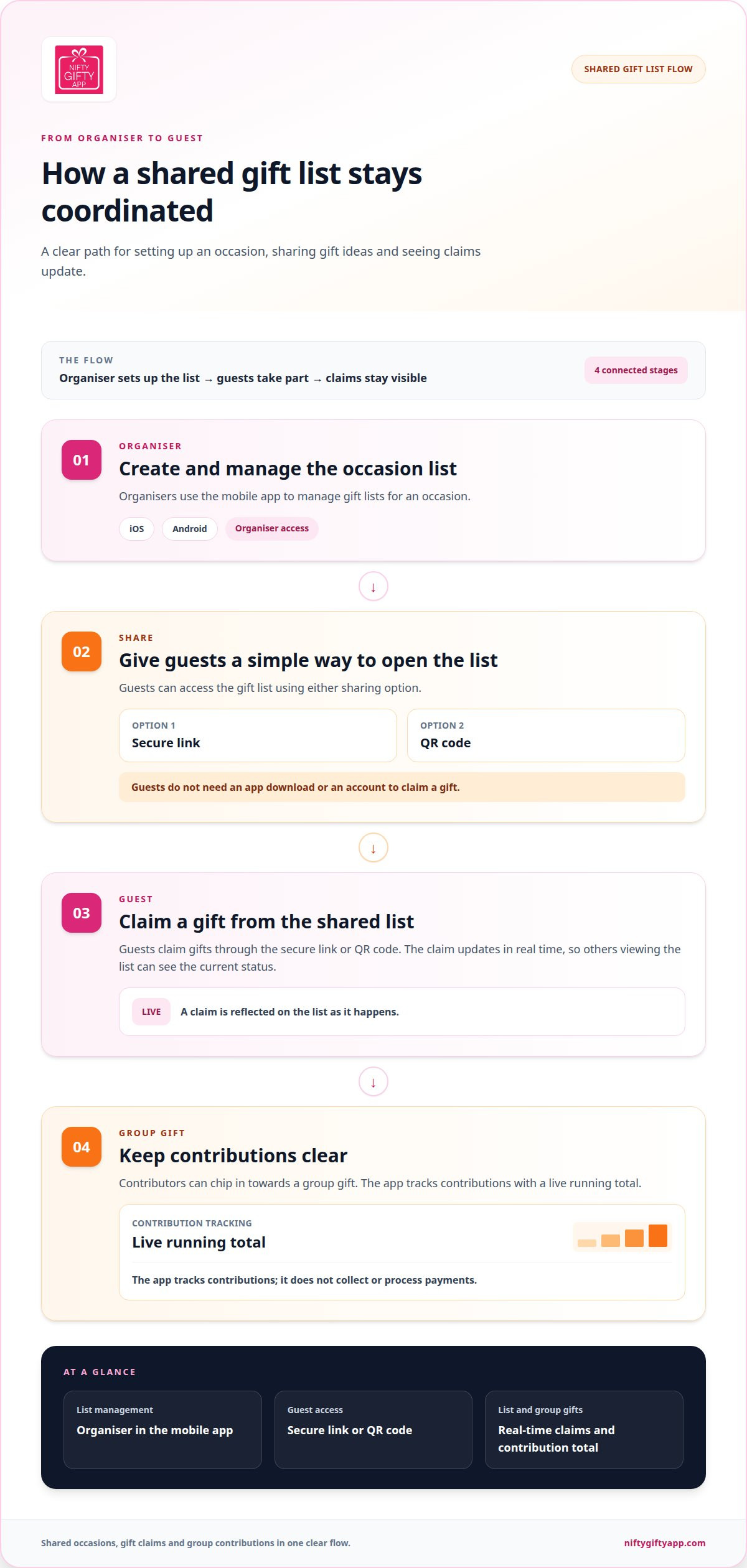
Nifty Gifty App helps families organise occasions and track gift claims in real time. Organisers manage lists in the mobile app on iOS or Android, then share them using a secure link or QR code. Guests can claim gifts in a browser without downloading the app or creating an account.
For a group present, contributors can add contributions while the app tracks them with a live running total. Payment is arranged separately between contributors and the organiser; the app doesn’t collect or process payments. It doesn’t sell gifts or gift cards, so relatives choose and purchase presents themselves.
If you want gifting coordination without a store-linked registry or advertising, Nifty Gifty App keeps the focus on lists, claims and contributions. Contact Nifty Gifty App to discuss organising your family’s next occasion.
Make the next occasion easier to organise
Choose a gift list that suits how your family wants to take part. Before setting one up, agree on who’ll add ideas, how relatives will access the list and how everyone can see what’s already claimed. A shared understanding can make gifting easier, whatever app you use.
A giftster alternative should fit those family habits, rather than asking relatives to change how they like to give. Start with the next occasion, then let your family’s experience guide what you organise afterwards. A clear plan gives everyone room to focus on choosing a present that feels right for the recipient.
Ready to bring your family’s gifting into one place? Explore Nifty Gifty App and take a practical next step towards more considered celebrations.
Frequently Asked Questions
Are family wishlist apps free?
Some offer a free plan, while others use a trial before charging for continued access. Check what the plan includes and when billing starts. Nifty Gifty App has a 14-day free trial, then $7.99 a year. That gives families a clear point to consider: whether they want a continuing paid tool or only need a basic list for an occasional celebration.
Does anyone recommend a private online wishlist app for gift ideas?
Choose an app with sharing controls and accessible data-management settings. In Nifty Gifty App, users can manage data through Settings, then Data, then Data Management. An organiser reviewing old birthday lists can use these settings to download or delete data. Read the privacy information to understand how your lists and family details are handled.
How do I choose a family gift-list app?
There isn’t one right choice for every family; match the app to your routines and devices. Nifty Gifty App suits families managing recurring occasions: lists are archived the day after an occasion and can be unarchived later, with gifts and recipients preserved. This keeps past celebrations out of the way while you prepare a new list.
What privacy and data-sharing risks do gift list apps have?
A shared list can reveal gift ideas or personal details to people beyond the intended group if access settings are unclear. Before sharing, consider what each link opens and whether it can be forwarded. Keep sensitive information out of gift notes, and use the available settings to manage stored data. In Nifty Gifty App, data download and deletion options are in Settings under Data Management.



Comments