
How to share a gift list with family

A shared list beats a trail of separate messages. To work out how to share a gift list with family, keep one list up to date and share it by text, email, group chat or social media. Ask relatives to reserve the gifts they plan to buy, which helps prevent duplicate presents.
Gift giving can get bogged down in coordination: one person has the latest ideas, someone else is scrolling through an old message, and two relatives choose the same thing. A shared list gives everyone one place to check.
Here, you’ll learn how to organise lists for birthdays, Christmas and other occasions, what to look for in a wishlist app, and how to keep gift choices visible without spoiling the surprise. We’ll cover practical sharing habits, ways to coordinate across a large or spread-out family, and how reservation features help relatives choose with confidence.
Table of Contents
What's the best way to organize wish lists for an entire family?
Start with one family group and a clear place for each person’s wishlist. Choose how you’ll share updates, then agree on a simple way to mark gifts someone plans to buy.
Private family group sharing
Create a private group for relatives who take part in birthdays or Christmas. Add the family members who need access, then share each person’s list there. For example, Priya can post her wishlist in the family group instead of messaging every aunt, uncle and cousin separately.
Before sharing, decide who can view or update each list. Keep personal details out of the group, and include only gift ideas and useful notes, such as a preferred colour or size. A clear group name, such as “Patel family gifts”, helps relatives find the right place later.
Text, email and group chat sharing
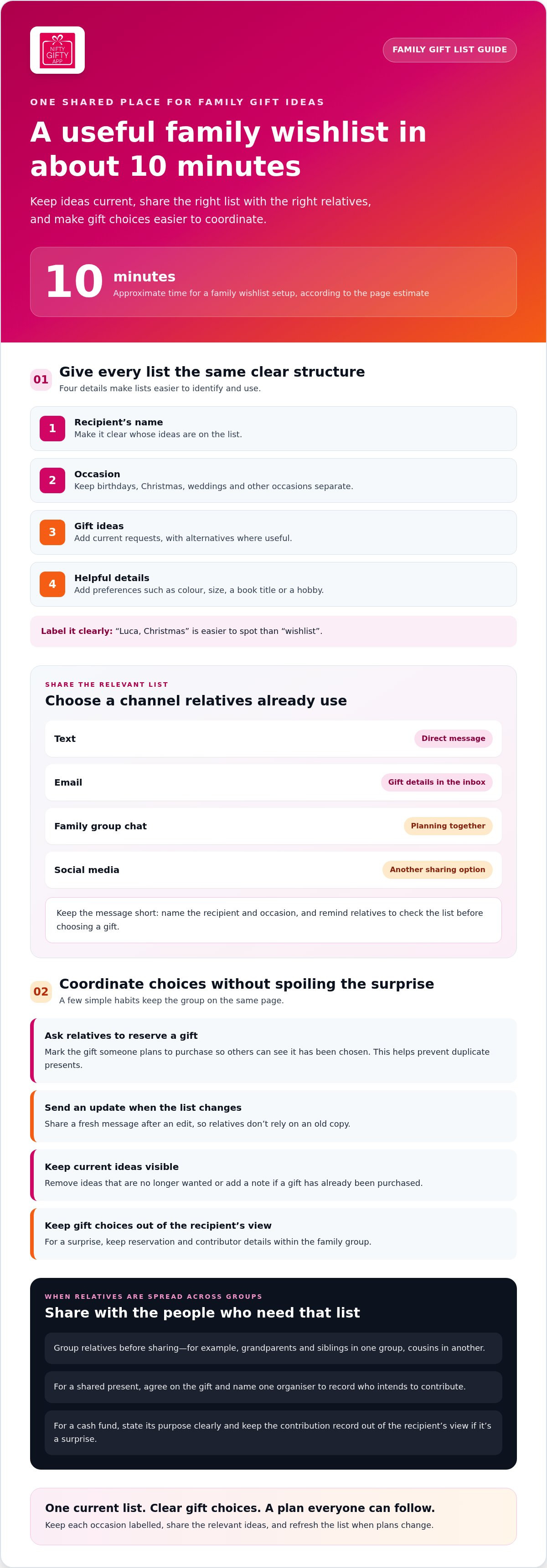
Match the sharing method to the people receiving the list. Text a link to relatives who prefer direct messages, or use email for family members who want gift details in their inbox. A family group chat works well when everyone already uses it to plan occasions.
Keep the message short and name the recipient and occasion. For example: “Here’s Ava’s birthday wishlist. Please check the list before choosing a gift.” If you update the list, send a fresh message so relatives don’t rely on an old copy.
Sharing lists with multiple people
For a large family, sort recipients into groups before sharing. You might have one group for grandparents and siblings, and another for cousins. Send each group the relevant list rather than filling every chat with everyone’s gift ideas.
Groups also make it easier to coordinate a shared present. Relatives can agree on one gift while the organiser tracks who plans to contribute. Set out the contribution plan in the group conversation so everyone knows how to take part.
Keeping family wishlists together
Use a consistent format for every family member: recipient’s name, occasion, gift ideas and helpful details. For example, label a list “Luca, Christmas” rather than “wishlist”. This makes the right list easier to spot when several occasions are coming up.
Keep older ideas separate from current requests. When a gift is no longer wanted or has already been purchased, update the list or add a note. This quick tidy-up helps relatives choose using the latest information.
Group gifts and cash funds
Agree on the shared gift before relatives start contributing. For example, family members might choose one larger present for a grandparent instead of selecting separate items. Name one organiser to record who intends to contribute and keep the plan with the gift list.
For a cash fund, state its purpose clearly, such as helping with a family member’s travel costs. Keep the contribution record out of the recipient’s view if the gift is a surprise. A clear note helps relatives understand the plan without creating another message thread.
Gift lists for birthdays, Christmas, weddings and other occasions
Give each occasion its own list instead of adding every idea to one running wishlist. A birthday list can focus on one recipient, while a Christmas list can hold ideas for several relatives. Label each list with the person’s name and occasion, then share the relevant one with family.
Birthdays and reminders
Add birthday gift ideas as the recipient mentions them throughout the year. Include practical details, such as a favourite colour, book title or hobby, so relatives can choose thoughtfully. A list for Maya’s birthday, for example, can hold a few ideas without mixing them with her Christmas wishes.
Keep the birthday date with the list or in a family calendar. Set a reminder to review the ideas before sharing, and remove anything Maya has since purchased or no longer wants. A family wishlist setup takes about ten minutes, according to the page estimate, so you can create a useful list without turning occasion planning into a project.
Christmas lists
Christmas often involves several recipients, so make one list per person or one clearly labelled list with separate sections. For example, add headings for “Mum”, “Dad” and “Luca” beneath the Christmas list. This helps relatives quickly find ideas for the person they’re buying for.
Share the Christmas list early enough for relatives to compare ideas and coordinate. Be specific about preferences, such as a particular novel or board game, and add alternatives if the exact item isn’t available. Update the list as plans change, then tell the family group about important edits.
Weddings and other occasions
A wedding list needs a different approach from a birthday wishlist. Organise gift ideas around the couple, and note whether each idea is intended for one person or both. For an anniversary, housewarming or graduation, create a separate list so its suggestions don’t get mixed up with Christmas or birthday plans.
For each occasion, name the recipient, add relevant preferences and share the list with the people taking part. If a couple has already received an item, remove it or mark it clearly. This simple update helps relatives choose from current ideas instead of relying on an old message.
Revealing gift-givers after the occasion
Some families prefer to keep the giver’s name quiet until the celebration ends. Ask each relative to include their name with their gift choice, then keep that information out of the recipient’s view. After the birthday, wedding or Christmas gathering, reveal who chose each present in person or in the family chat.
For a group present, note who contributed and decide together how to reveal the names. The organiser can prepare a short list of contributors before the occasion, then share it afterwards. This makes it easier to thank everyone without announcing the surprise too soon.
How can families avoid duplicate gifts without spoiling the surprise?
Ask relatives to reserve the gifts they plan to buy. A shared list can show which ideas are already claimed while keeping the recipient out of the conversation. For example, if three cousins are choosing birthday presents for Isla, each can check the list before shopping.
Set a clear reservation routine
Agree on one simple rule: check the current list, reserve an idea, then buy it. Ask relatives to mark a reservation promptly, rather than waiting until they reach the shops. That gives others a chance to choose something different.
Add a short note beside each reserved gift, such as “Aunty Jo has this one”. If the list can’t show reservations, ask family members to message the organiser directly. The organiser can update the group’s copy and remove the claimed idea from view.
For a group present, name one coordinator before anyone contributes. They can record the planned gift and let other relatives know it’s covered. This also works for a larger present: one cousin handles the main item while others choose separate additions.
Keep list editing with the owner
Let the recipient add or edit their gift ideas, but keep purchase notes in a separate view or organiser-only message thread. For example, Dad can add a preferred gardening book to his wishlist while his daughter privately records that Uncle Ben has reserved it.
If several relatives edit the list, agree who can change the ideas and who can only reserve them. Too many editors can remove useful details or mark an item incorrectly. A clear owner keeps the list accurate, while a separate reservation record keeps gifting coordinated.
Hide purchases from the recipient
Keep the recipient out of reservation messages and purchase updates. A family chat that includes everyone might reveal a surprise through a notification or visible message preview. Instead, use a separate conversation for gift-givers, and avoid naming the recipient in its title if they can see the chat list.
When relatives shop in physical stores, they can reserve an idea before leaving and message the organiser after buying it. The organiser can update the private record without posting details where the recipient might see them. For online orders, share only the item’s status, not a delivery notification or tracking details.
Check the list before the occasion
Before a birthday or Christmas gathering, the organiser can review every reservation with the gift-givers. Remove gifts that have been purchased, and check that no two relatives have chosen the same idea. If plans change, tell the group promptly so someone else can choose a different present.
What should I look for in a family wishlist app?
Choose a wishlist app that makes sharing simple for family and friends, including relatives who rarely use apps. If someone can’t open the list, resend the latest link and make sure they’re using the complete address.
Sharing lists with family and friends
Look for clear ways to share gift ideas with relatives and friends beyond your immediate family. A child’s birthday list, for example, might go to grandparents, cousins and school friends’ parents. Check that you can share it with the right people without making the list visible to everyone.
For children’s wishlists, have a parent or carer manage the ideas and sharing. Add practical notes, such as a favourite book series or colour preference, rather than personal details. Before sending the list to family and friends, make sure each suggestion still suits the child and the occasion.
Consider how guests can view the list, too. Some relatives may prefer a browser, while others may use a mobile device. Choose an option that suits the people you’re inviting, not just the person organising the list.
Sharing through a single wishlist link
One wishlist link can make sharing easier across different conversations. Send the same list to relatives by text, email or family group chat. For example, an organiser can share one link for Noah’s birthday with both sides of the family instead of copying ideas into separate messages.
Check what happens when someone opens the link. Does it take them straight to the correct list, or require extra steps? Find out whether guests need an account or app, and whether they can view gift ideas without changing them.
Also check how the link works when the list changes. If the organiser adds a new idea, relatives should be able to return to the current list rather than an outdated screenshot. When sharing it, send a brief message that clearly names the recipient and occasion.
Resolving shared-list access issues
If a family member can’t access a shared list, resend the latest link first. Ask them to open the full message rather than tapping an older link in a long conversation. A link copied from a previous email may point to a different list or an old version.
Next, ask which device and browser they’re using. They can try opening the link in another browser or on a different device. If the list asks them to sign in, follow the displayed steps or ask the organiser to share access another way.
For a relative who struggles with links, send the list by email or talk them through opening it by phone. Keep the recipient’s gift details out of shared troubleshooting messages if the list is meant to stay a surprise. Once access works, ask them to save the current message for the next occasion.
Avoiding duplicate presents
Duplicate gifts often happen when relatives make plans in separate conversations. Someone sees a popular book in a family chat, then chooses the same title while shopping. A shared list helps everyone see which ideas are still available, as long as the group keeps its status up to date.
Make the list useful when relatives are choosing. Give each suggestion enough detail to distinguish it from similar options. “Blue insulated drink bottle” is clearer than “water bottle”; an author and title identify a book more precisely than its genre. Add a note if the recipient has a particular size, colour or version in mind.
Use a straightforward status for each idea, such as available, reserved or purchased. Ask relatives to reserve an item before setting out to shop, then update its status once they’ve bought it. This gives the next person a clear signal to choose another idea rather than rely on an old message or assumption.
Check: Look at the current list before choosing a present.
Reserve: Mark the idea or tell the organiser before purchasing it.
Update: Change the status after purchase, or release it if plans change.
Choose again: Pick another available idea if someone has claimed yours.
For example, if Mia’s list includes a puzzle and a set of watercolours, her aunt can reserve the puzzle. Her cousin can then choose the paints instead of guessing what another relative plans to give. If the aunt changes her mind, she should release the puzzle promptly so it’s available again.
Watch for near-duplicates, too. Two relatives might choose different editions of the same book or separate accessories that serve the same purpose. Ask the organiser to clarify whether the recipient wants a specific version. For clothing, include the size and colour preference; for a game, include its full name or edition.
Group presents need one person to own the plan. If relatives are contributing towards a single item, record it as one shared gift rather than leaving it open for individual selection. The organiser can track who intends to contribute and tell the group which present is covered.
Before a birthday or Christmas gathering, compare the list with relatives’ latest updates. Follow up privately with anyone whose reservation is unclear. A quick check can catch two people planning the same present while keeping gift details away from the recipient.
Nifty Gifty App
Nifty Gifty App brings family gift lists and occasion planning together. Organisers manage lists in the mobile app on iOS or Android, then share them with guests through a secure link or QR code. Guests don’t need to download the app or create an account to claim a gift, and claims update in real time.
This can help when relatives are spread across cities or when a family wants one place to track gift choices. For a group present, contributors can chip in while the app tracks contributions with a live running total. Payments happen separately: the app doesn’t collect or process them.
To organise your next occasion this way, visit niftygiftyapp.com.
Make the next occasion easier to organise
Let one person set the tone for your family’s gifting routine. Before the next occasion, agree where ideas belong, who keeps them current and how relatives flag a present they plan to buy. This simple habit gives everyone a clear role, whether they’re nearby or celebrating from another city.
That’s the practical answer to how to share a gift list with family: make it easy to find, easy to update and useful to the people choosing gifts. Keep the routine flexible, too. A birthday list may suit a small family chat, while a larger gathering may need one shared place for everyone involved.
If you’d like a dedicated way to organise family gift lists, explore Nifty Gifty App and see whether it suits your next occasion. Here’s to thoughtful presents, shared excitement and more time to enjoy being together.
Frequently Asked Questions
How can I organise gift giving for a large or extended family?
If you’re deciding how to share a gift list with family, start by choosing one organiser for each occasion. For a family spread across households, assign a relative to coordinate each recipient’s gifts. One sibling might arrange Nan’s present while cousins choose separate gifts for other relatives. Keep the recipient out of gift-giver conversations when surprises matter, and agree where everyone can find the latest plan.
Why coordinate family gifts in one place?
The question of how to share a gift list with family often comes up when relatives are planning from different households. A shared record gives everyone the same current details instead of relying on separate messages or memory. Note the recipient, occasion and coordinator. For a group present, record who’s arranging the purchase and who intends to contribute, so relatives know their role.
How do you create and share a gift registry at Australian retailers?
Use the retailer’s registry process: choose its registry option, add gift ideas from its range, then follow its sharing instructions. Features and terms differ between retailers, so the steps can vary. Nifty Gifty App is a separate mobile gift-list app, not a store-linked registry. Organisers can create lists and share them with guests through a secure link or QR code.
How can you let family reserve or mark gifts as purchased to avoid duplicates?
Agree on a simple status system, then ask each relative to update the list as plans change. Someone can mark an idea reserved before shopping and purchased afterwards. If the list doesn’t support status labels, have relatives tell the organiser privately. The organiser can maintain a separate record and let the family know which ideas remain available without revealing details to the recipient.



Comments