
Wishlist app no sign up for guests and gift claiming

Yes. A shared wishlist link can make it easier for guests to access a list without needing separate invitations. A wishlist app with no sign-up required for guests lets you share a secure link or QR code, with claims updating in real time.
That matters when family and friends are ready to choose a gift but don’t want another account to set up. Keep the list easy to open and the gift choices clear, without adding a round of follow-up messages.
This guide explains how guest access and gift claiming work, how to add products to a list, and what personal details you may need to provide. You’ll also learn how to preview the wishlist as a guest before sharing it.
Table of Contents
Can I create a wishlist as a guest?
Guest access can mean different things. Some wishlist apps let guests add items or build a list without registering; others reserve list creation for the organiser. Check whether guests can view and claim gifts, as that is different from creating or editing the wishlist. A shared link can give friends and family access to the same list without separate invitations.
For a birthday, the organiser can add gift ideas and send the same link by text, email or family group chat. Relatives open it in a phone or computer browser. As the list changes, the existing link stays current, so there’s no need to send a replacement each time an item is added.
Keep the handover simple:
Create or update the wishlist in the app or service used by the organiser.
Copy the guest-accessible link, or share its QR code if available.
Send it directly to friends and family, with a short note naming the occasion.
Ask guests to check the list before choosing, which can help avoid duplicate gifts.
One link works well for relatives who don’t want another app or account. Send it in a familiar text message and explain that tapping it opens the list. A QR code offers another option for a printed note, provided the recipient has a device that can scan it. Someone who rarely uses online services may still prefer a phone call and a suggested gift.
Are public wishlist links a privacy or security risk? They can be: anyone with access to a public link may be able to view its contents. Share the link with intended guests rather than posting it openly, and leave private details such as a home address or personal contact information off the list unless they’re genuinely needed.
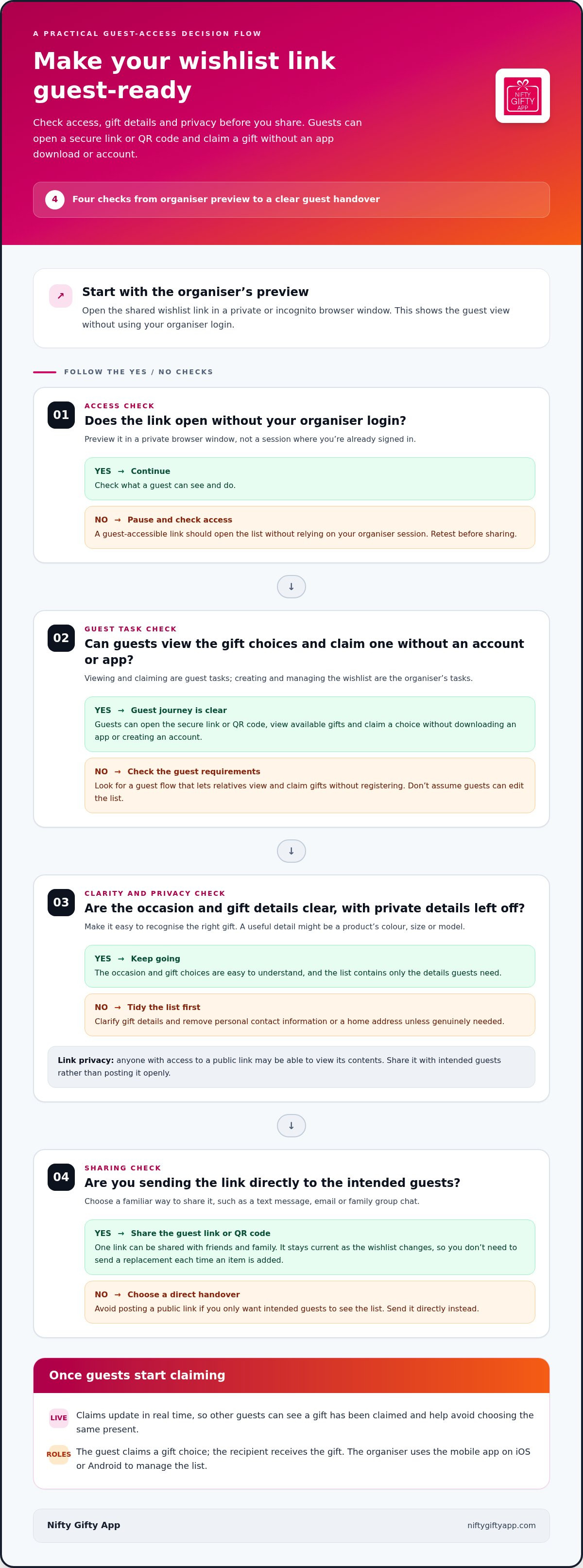
Before sharing a birthday wishlist, open its link in a private or incognito browser window. This lets you preview the guest view without using your organiser login. Confirm that the occasion and gift choices are clear and that the page opens without asking relatives to create an account.
A wishlist app with no sign-up for guests should make the guest’s next step clear: open the link, view available gifts and claim a choice if that feature is provided. The organiser still creates and manages the list; guests shouldn’t be assumed to have editing access. That distinction keeps a birthday list easy to share while helping friends, relatives and family choose with confidence.
Check what guest access includes before choosing a wishlist app. Guests may be able to view or claim gifts without registering, while list creation and editing remain the organiser’s responsibility.
Account and app requirements for viewing and claiming gifts
Guest access and organiser access are two different jobs. A guest may open a shared wishlist link, view gift choices and reserve an item without creating an account. The organiser, who builds and updates the list, may need an account or app to manage it. Check those requirements separately before inviting relatives to an occasion.
For guests, the test is simple: open the link in a browser and look for a clear way to claim a gift. A guest taps the option and follows the page’s instructions. When a claim updates the list in real time, others can see the choice and avoid selecting the same present.
Which wishlist apps work on iPhone, Android and desktop without a guest account? Choose one with a guest link that opens in a standard browser, so guests can view and claim gifts from any of those devices. The organiser’s tools may have different device requirements.
Before sharing, test the guest journey on a phone and a computer. Use a private or incognito browser window to see the list without an organiser session. Check that the occasion title, gift details and reserve button are visible. This quick test can reveal a sign-in prompt before a relative encounters it.
Open the shared wishlist link in a private browser window.
Check whether gift details and the claim option appear without signing in.
Test the same link on a phone and desktop browser.
Confirm that a claimed gift changes status for the next guest.
Guest claiming without an account keeps the task simple: open the link, choose an available gift and claim it. The recipient receives the gift; the guest claims the gift choice. Those roles matter when several relatives are coordinating contributions to a shared birthday present.
Can guest access become a permanent account? Opening a shared list as a guest doesn’t create an account or make someone the organiser. Anyone who wants to manage a list can use the service’s organiser tools. Keep the shared link for guests and use the app to edit and manage the list.
For an older relative using email rather than apps, send the link with a plain instruction: “Open this page, then tap a gift to reserve it.” If they prefer a computer, the same browser-based link avoids an app download. A family member who doesn’t use online services can still discuss gift choices with the organiser by phone.
When choosing a list for family gift coordination, separate three questions: can guests view, can they reserve without an account, and what device does the organiser need? A secure guest gift claiming flow can make the guest step clear while keeping list management distinct.
Adding products from different online stores
A wishlist can bring together gift ideas from different online shops. Copy each product’s page link and add it to the list with a clear name and useful details. For example, the list might include a book from one Australian retailer and a board game from another.
Start on the shop’s product page. Copy the web address, return to the wishlist and use its add-item option. Paste the link and check the saved entry. If the product name or image doesn’t appear, enter the name and key details yourself. A clear note such as “green insulated lunch bag” helps friends identify the right item.
Before adding a product, capture the details guests need to identify it:
Product name and the store name.
Colour, size, model or other important variation.
A working product link, if the wishlist accepts links.
A short note explaining why it suits the recipient’s wishes.
Those details matter when a store sells similar versions. A link may open a general product page rather than the exact colour or size. Add the chosen variation to the description, then open the link yourself to confirm it leads to the intended item. This quick check makes the list more useful to anyone choosing a surprise.
Some wishlist services offer a browser extension or add-on that puts an add-to-list option near a product page, saving copy-and-paste steps. These tools are service-specific, so don’t assume an extension works with every list or shop. If there isn’t a suitable browser option, copying the product link and entering the details manually is a practical alternative.
For a present you find on your phone, copy the product link from the shop’s share menu. Switch to the wishlist and paste it into a new item. On a computer, copy the address from the browser bar. Both methods bring gift ideas from different stores into one list.
Check links before sharing the wishlist. Remove tracking text only if the shop’s page still opens correctly. Keep each item title specific and add a note if the link points to a range of choices. If a product sells out, replace it with a current option or mark it unavailable, so guests don’t waste time opening an old page.
Choose the method that suits where you found the gift: use a browser tool when supported, or add the link and details by hand. Clear product names, variations and store links help relatives understand your wishes without searching through separate messages.
Creating a wishlist without providing personal information
A wishlist can share gift preferences without asking guests to register. The organiser creates and manages the list in the app; guests can view and claim gifts using the shared link. Keep those steps separate when you share the list.
To limit the personal information you share, review each field during registration and add only what the list needs, such as a display name and occasion. A birthday list can say “Mia’s birthday wishes” instead of publishing a child’s full name, birth date and home address together.
Before sharing, review the list for details guests don’t need:
Use a first name, nickname or occasion label where suitable.
Describe the gift clearly without adding private family details.
Remove addresses and phone numbers unless the service needs them.
Share the link directly with invited relatives and friends.
Online shops such as Amazon may ask shoppers to sign in for their own account features. That doesn’t mean guests need an account to view a shared wishlist. The product link leads to the shop, while the wishlist shows gift choices. Check the shop link separately, since its sign-in prompts are distinct from access to the wishlist.
For a child’s list, an adult can manage the occasion and choose what details to include. Use a simple label such as “Sam’s birthday list” and avoid adding school, regular activities or contact information. Share the link with intended friends and family, not in an open social post, and review the list before each sharing round.
Creating a wishlist without registration depends on the service’s organiser setup. Some services let someone build a list without an account; others require registration to save changes. If an account is needed, use the minimum details requested and check whether guests can still open the shared list without registering.
Keep the organiser’s account separate from guest access, and don’t send passwords in a family group chat. Share the wishlist link with guests, then make edits in the app. If another adult needs to maintain the list, use the service’s sharing controls rather than passing around login details.
A quick privacy check takes three steps: open the guest link in a private browser window, scan the visible list for personal details, then remove anything unnecessary. A relative should be able to understand a child’s gift wishes without seeing the child’s full birth date or family contact information. This keeps the list useful while limiting what the shared page reveals.
Which wishlist app is best for birthdays and weddings?
Compare guest access, gift claims, store links and organiser tools for the occasion. For Australian retailers, check whether the list accepts local shop links and displays prices in A$, as support varies between apps.
No-sign-up guest access doesn’t tell you whether item limits or paid features apply. Compare what guests can do with what organisers need before creating an account.
Birthday and holiday use cases
A birthday list usually centres on one recipient, while Christmas may involve lists for several family members. For a wedding, make the list link easy to find, for example on the wedding website. A baby shower list can group practical gift ideas for guests to browse.
Compare how each wishlist handles your occasion, not just its sign-up process. For a birthday, look for clear gift details and a way for guests to claim a choice. For Christmas, share separate lists with the right relatives. For a wedding or baby shower, choose an approach that makes it easy for the organiser to keep details current.
Birthday: Create one list around the recipient’s current wishes.
Christmas: Keep each person’s gift ideas distinct for family sharing.
Wedding: Place the registry link somewhere guests can find it, such as the wedding website.
Baby shower: Arrange gift ideas so guests can browse and choose.
Check product links from Australian retailers separately. Add a local shop link, then open it from the wishlist to confirm it leads to the intended item. Make the product variation clear, especially for baby shower gifts with different colours or sizes. If the list doesn’t show the price, guests can view the details on the retailer’s page.
Item limits and paid features
Before building a wedding list or several Christmas lists, check how many items and occasions the app supports. Nifty Gifty App has no limit on occasions or gifts, and its features are included in one annual subscription. Guests can view and claim gifts without registering.
Separate the organiser’s requirements from the guest’s. With Nifty Gifty App, organisers manage lists in the mobile app, while guests view and claim gifts through a browser link without an account. Try the guest link with a product from an Australian retailer to confirm it opens as expected.
Choose the setup that fits the occasion and the people taking part. If you’re coordinating birthdays, weddings or family celebrations, organise gifts across occasions with a shared list and clear claims.
Nifty Gifty App
Nifty Gifty App helps organisers manage gift lists for birthdays, weddings and family occasions. Organisers use the iOS or Android app to add gifts and share a secure link or QR code. Guests can claim gifts in a browser without an account or app download, and claims update in real time.
For a group gift, contributors can coordinate contributions while the app tracks them with a live running total. Payments are arranged separately: Nifty Gifty App doesn’t collect or process them. Recipients receive the gifts, while guests claim gift choices.
Choose Nifty Gifty App to organise gift lists and track claims across occasions. Visit niftygiftyapp.com to explore the app.
Make gifting easier for the next occasion
Set a simple family routine before the next occasion: decide who will maintain the list and how everyone can suggest ideas. This gives relatives a clear way to share preferences as plans take shape. A child might mention a new interest, or a couple may update their wedding wishes. Keep the process flexible so it can change without turning gift planning into another job.
A wishlist app with no sign-up for guests makes it easier for relatives to take part. Choose an approach that suits the people you’re organising for, then reuse that routine for each occasion. After a celebration, note what helped the family coordinate and what you’d change next time. Small adjustments can make the next round feel more thoughtful and personal.
Ready to plan your next occasion? Explore Nifty Gifty App and see how it could fit your family’s gifting routine. Bring everyone’s ideas together, then focus on enjoying the celebration.
Frequently Asked Questions
What should I look for in a wishlist app?
Choose one that suits how you organise gifts, not just how guests access a list. Check whether it supports your occasions, gift tracking and budget planning. Nifty Gifty App includes a 14-day free trial, then $7.99 a year. Its product information also states there’s no limit on occasions, gifts, contacts, recipients or claimants, which can suit families managing several lists.
Can other people reserve items without creating an account?
Yes, if the service supports guest claims. Check how it labels an item after someone selects it. Nifty Gifty App uses available, claimed and purchased statuses, helping the organiser distinguish a guest’s claim from a completed purchase. For a group gift, agree who will track its progress so family members know whether it’s still being coordinated.
Do I lose the ability to share if I stay a guest?
No. You can open a list shared with you without creating an account. Sharing and managing a list are separate tasks, so guests can’t change its settings. If you’re planning an occasion yourself, use the organiser tools to create and manage your own list.
How Do Guests Claim Gifts Without an Account?
Open the list in a browser and use its claim option. A claim tells the group you’ve chosen that gift, but it doesn’t confirm that the gift has been purchased. If plans change after you claim a present, let the organiser know so they can keep the list status accurate for everyone.
How do I stop two people from buying the same gift?
Make gift status part of the group’s routine. Ask whoever purchases an item to update its status, especially when relatives coordinate across separate chats. For a shared present, choose one person to track the arrangement and tell others where updates will appear. Clear ownership and current list details help everyone coordinate.
What Does Frictionless Wishlist Sharing Look Like?
Clear details give guests enough context to choose without needing a separate explanation for each item. Name the occasion, use recognisable gift descriptions and include important variations such as colour or model. “Blue insulated bottle” is more useful than “bottle”. A short message can also explain whether the list is for ideas, individual gifts or a group present.
Which wishlist apps allow sharing a wishlist with a link without an account?
Nifty Gifty App provides guest access through a shared link, with no guest account required. Organisers manage lists in the iOS or Android app, while guests open the shared page in a browser. If your relatives use different devices, consider the organiser’s setup separately from the guest’s way of viewing the list.
Which wishlist apps let guests browse without signing up?
Nifty Gifty App lets guests access shared gift lists without signing up, while organisers manage occasions in the mobile app. It can suit a family that wants to organise multiple celebrations and keep gift ideas and budgets together. Consider whether you also need occasion planning and tracking when choosing a wishlist app.



Comments